Link in bio for Instagram: buttons, products and payments
A link in bio in PulseMarko is one page with an address like …/l/your-brand. You put it in the header of your Instagram or TikTok profile, or in the description of a Telegram channel. The page has buttons to your website and messengers, a request form, and on the Basic plan also products that the buyer pays for by card straight to your account.
The free plan has no time limit: up to 20 buttons, a request form, 30 days of statistics, 6 themes and a QR code. The page footer shows "Made in PulseMarko".
What a link in bio page is, and why you need one if Instagram gives you 5 links
Since 2023 Instagram has let you add up to five links to a profile. For a blogger with a YouTube channel and a website, that is often enough. If you sell through your profile, it is not: a link in a profile does not take payment, does not collect phone numbers, and does not show how many people clicked it.
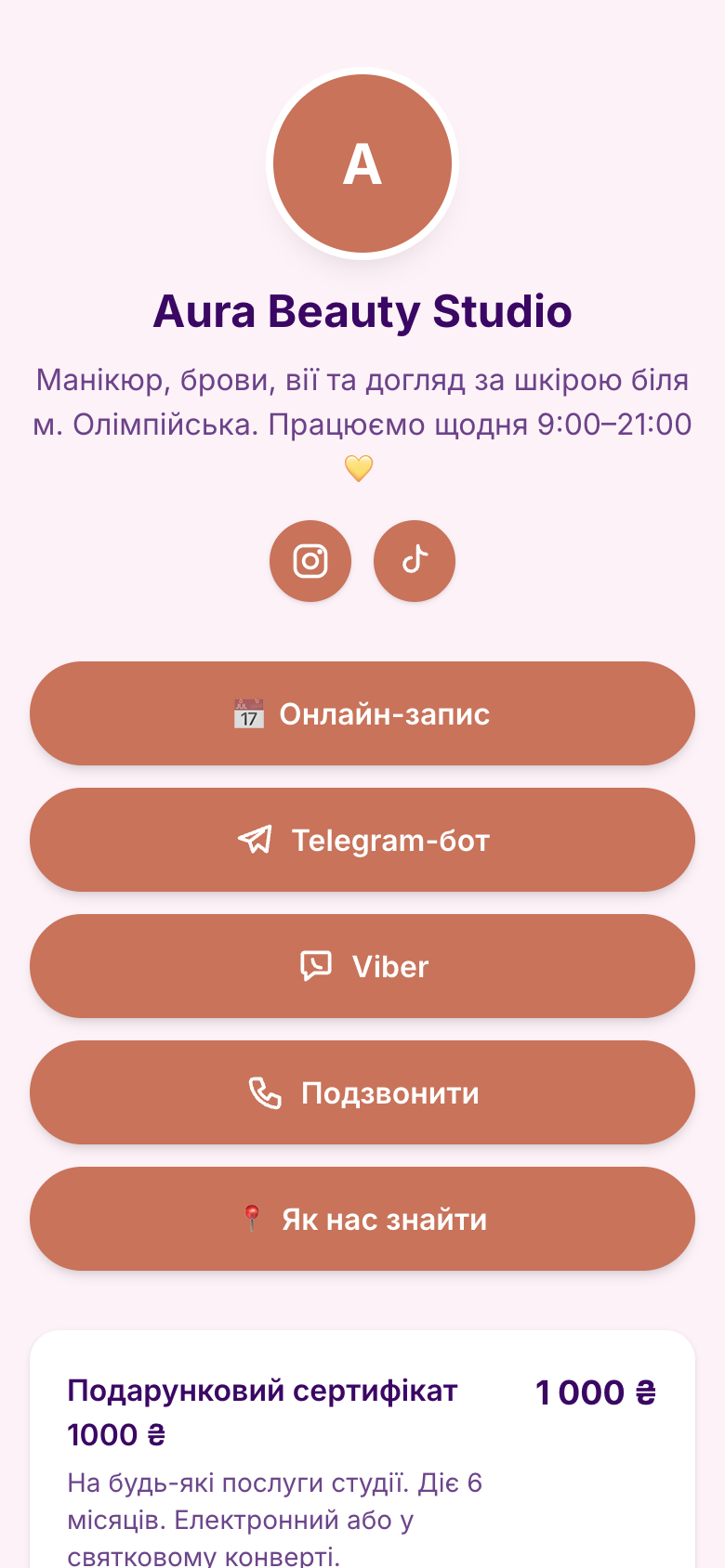
In that case you put the address of a link in bio page in the header. On it you can place:
- up to 20 buttons: a website, a catalog, reviews, a Google Form, any other page;
- "message me" buttons for Telegram, Viber and WhatsApp, and a call button. You only enter a @username or a number like 067…, and the service builds the correct link itself;
- Instagram, TikTok, YouTube and Facebook icons under the header, and a YouTube video right on the page;
- a request form with the fields "Name", "Phone" and a comment;
- products and services with payment (Basic plan).
You can give the same address in TikTok, in a Telegram channel description, on a business card, or as a QR code at the checkout.
What gets in the way of selling through your profile header
Every message has to be answered by hand, and some people leave without waiting for a reply.
A product has a photo, a price and a "Buy" button. The buyer enters a name and phone and pays by card, or through Apple Pay or Google Pay if the payment service supports it. If a Telegram bot is connected, it sends you the payment message.
An ad with one blogger, a story and a TikTok post all lead to the same link.
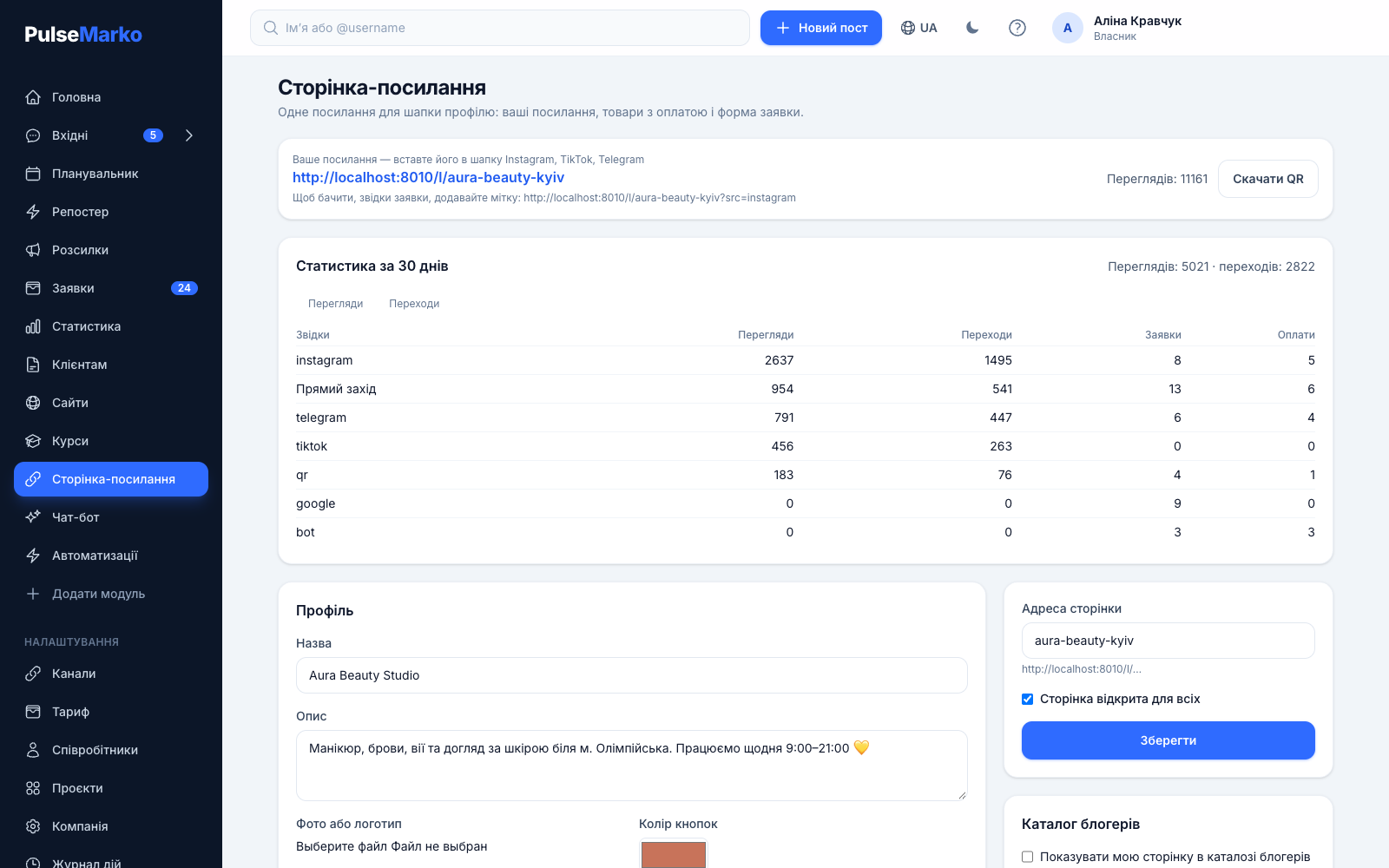
Add the tag ?src=instagram or ?src=tiktok to the address. The editor shows views, clicks, requests and payments for each source separately.
Screenshots do not confirm that.
Give the blogger a personal promo code with a discount. Next to the code you see in how many orders it was applied, and in "Requests" you see which of those orders are paid.
A guide or presets sell at night, and the person waits until morning.
In the product card choose what the buyer gets: a link, a file or access to a closed Telegram channel. After payment it appears on the "Payment received" page.
How to create a link in bio page and put it in your profile header
Everything is set up in the "Link in bio page" section of the PulseMarko dashboard. No code is needed.
Fill in the profile
In the "Profile" block enter a name and a description of up to 500 characters, and upload a photo or logo. Pick a button color and a page theme: Light, Dark, Soft, Outline, Strict or Night.
Add buttons
Click "Add link", pick a type and paste an address, @username or phone. If the address cannot be recognized, the editor will not save it and will show what to check.
Publish the page
Set the "Page address" in Latin letters, tick "Page is open to everyone" and click "Save". Paste the resulting link into Instagram through "Edit profile" → "Links".
Products with payment: the money goes to your account
In the "Products and services" block you can add up to 20 items. For each one you set a name, a price in hryvnias, a short description and a photo. The buyer clicks "Buy", leaves a name and phone, optionally enters a promo code, and goes to payment.
The money is accepted by your online acquiring. Buyers' funds do not pass through PulseMarko, so we take no commission on sales. In the "Accept payments" block you can connect one of these payment services:
- monopay (monobank)cards, Apple Pay, Google Pay
- LiqPay (PrivatBank)cards, Privat24, Apple Pay, Google Pay
- NovaPay (Nova Poshta)cards, Apple Pay, Google Pay
- WayForPaycards, Apple Pay, Google Pay
- HeleketUSDT, BTC, ETH, TON
Payment service keys are stored encrypted. Until acquiring is connected, orders arrive as requests, and you arrange payment with the buyer yourself.
What the buyer gets after paying
For digital products the card has a "What the buyer gets after payment" field. You can choose a link (a guide, a lesson, a folder), a file up to 50 MB, or a personal one-time invitation to a closed Telegram channel. A file opens only for a paid order, and its link works for one day. Invitations need your Telegram bot with admin rights in the channel.
Promo codes, requests and click statistics
Promo codes for bloggers
Up to 50 codes per page. For each one you set a percentage discount, a usage limit and a date in the "Valid until" field. The buyer enters the code before paying, and the total is recalculated right away. Promo codes are available from the Basic plan.
Requests in one list
The "Requests" section has the filters "New", "Paid", "Awaiting payment" and "Processed". Each request is labeled with where the person came from. Your connected Telegram bot messages you about a new request, order and payment.
30-day statistics
A chart of views and clicks by day. Below it is a table by source with the columns "Views", "Clicks", "Requests" and "Payments". The source is taken from the ?src= tag, a UTM tag, or the site the visitor came from.
QR code for print
The "Download QR" button gives an SVG file that keeps its quality on a banner or sticker. Visits from the QR code are counted as a separate source, "qr", so you can see how many people came from printed materials.
PulseMarko blogger catalog
A blogger can show their page in the public catalog: tick the consent box, then choose a niche and a city. Spots in the catalog are not sold, and the order depends on views and requests over 90 days. Without the checkbox your page is not in the catalog, and if you untick it, the page disappears from there at once.
For SMM specialists: post approval and a client report
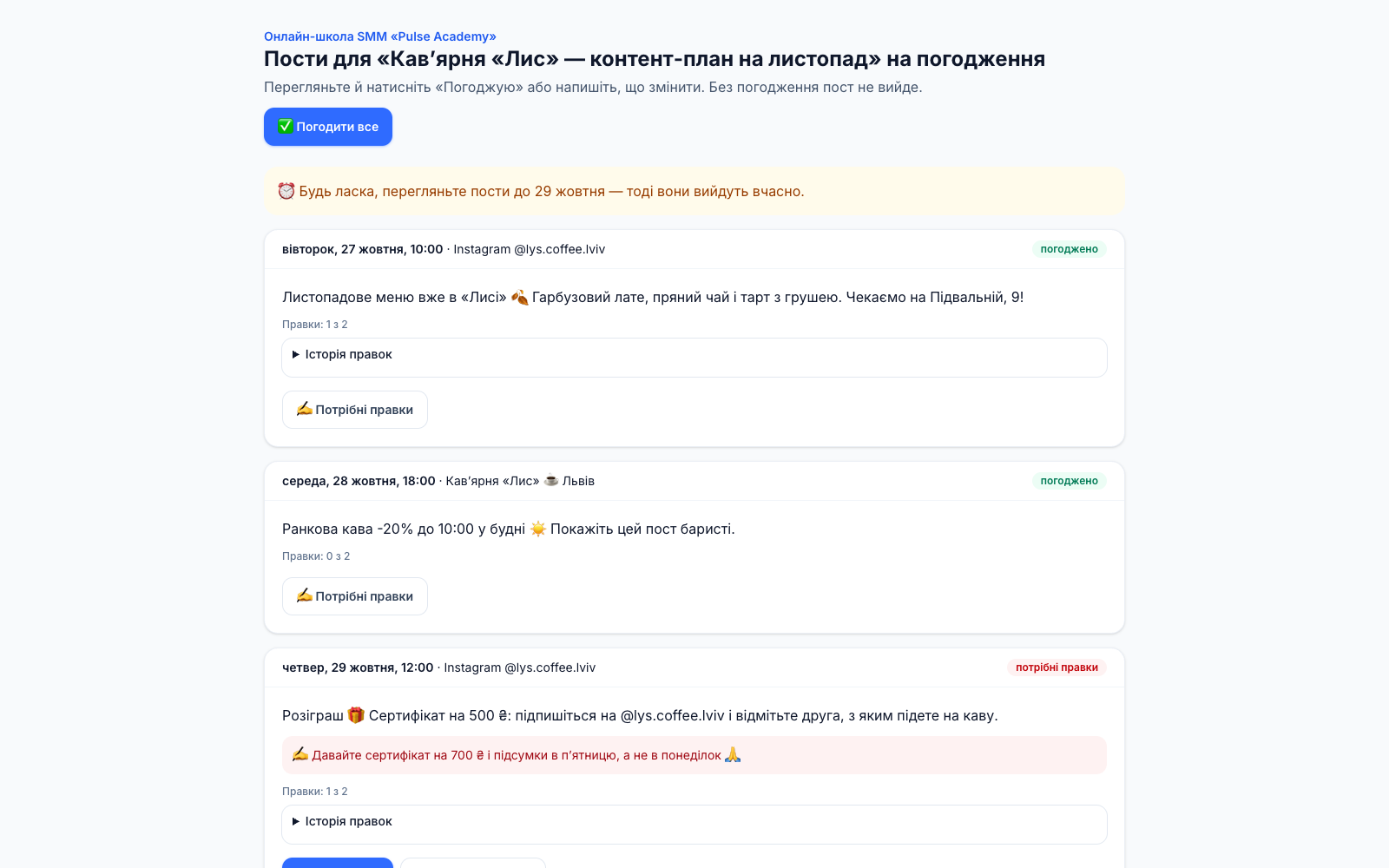
If you run social media for clients, the "For clients" menu lets you create an approval link for a client. They do not need to sign up. The client sees the posts for the chosen period and clicks "Approve", "Approve all" or "Changes needed" with a comment. Until a post is approved, the scheduler will not publish it.
For the link you set a "Reply by" date and the number of revision rounds under the contract. If the client stays silent after that date, you get a Telegram reminder to resend the link. The report for a period opens through a separate link and is saved with the "Save PDF" button. The posts themselves are prepared in the scheduled posting planner.
How much a link in bio page costs
PulseMarko modules are bought separately, and the free plan has no time limit. Prices are in dollars, and hryvnia amounts are approximate at 45 ₴/$. When you pay in hryvnias, the invoice is converted at the NBU rate.
Free
- up to 20 buttons: links, messengers, social networks, video
- request form and the "Requests" section
- 6 themes, QR code, 30 days of statistics
- "Made in PulseMarko" credit at the bottom of the page
Basic
- everything in Free
- up to 20 products and services with photos
- payment through monopay, LiqPay, NovaPay, WayForPay or Heleket, 0% PulseMarko commission
- up to 50 promo codes
- delivery of a file, a link or a Telegram channel invitation after payment
- up to 3 pages
Pro
- everything in Basic
- up to 20 pages, one for each client project
- requests of each page in a separate list
For SMM and agencies
A separate module: links for clients to approve posts, and reports.
- Free1 link
- Basic, $5.49 (≈247 ₴)10 links
- Pro, $10.99 (≈495 ₴)unlimited
What to know before you start
- The free plan includes one link in bio page, Basic up to 3, Pro up to 20. Each extra page belongs to a separate client project, and projects are created in the Planner on the Pro plan.
- You cannot connect your own domain to a link in bio page. If you need one, use the website builder with your own domain.
- Product prices are set in the currency from the company settings, which is the hryvnia for Ukraine. The page has no fiscal receipts (PRRO), delivery calculation or stock tracking.
- Facebook, TikTok and Google Analytics pixels cannot be installed on the page. Only the built-in statistics work.
- Automatic delivery works only after payment. A free product at 0 ₴ is not delivered automatically.
- Telegram notifications and invitations to a closed channel work through your Telegram bot, which you need to connect in the "Channels" section.
- Instagram, Facebook, WhatsApp and TikTok as channels for bots and publishing are still in development: the connection will open after the app is reviewed by Meta and TikTok. You can put the link in bio address in your profile header right now, and that review does not affect it.
Frequently asked questions about link in bio
What is a link in bio page?
It is one web page with buttons whose address you put in your profile header instead of a regular link. From it a person goes to your website or a messenger, leaves a request or buys a product.
Can I create a link in bio page for free?
Yes. The free plan has no time limit: up to 20 buttons, a request form, 30 days of statistics, six themes and a QR code. You need a paid plan to sell products with payment: Basic costs $3.29 per month (≈148 ₴).
Why do I need a link in bio page if Instagram lets me add 5 links?
Links in an Instagram profile only open the addresses they point to. A link in bio page also has a request form, products with payment, promo codes and click statistics for each button and source.
How do I add the link to my Instagram profile header?
Copy the page address from the PulseMarko editor. In Instagram open your profile, tap "Edit profile", then "Links" and "Add external link", paste the address and save.
How do I accept payment through monobank, LiqPay or WayForPay without a website?
Connect your online acquiring in the "Accept payments" block. monobank needs a token from web.monobank.ua, LiqPay needs a public and a private key, and WayForPay needs the Merchant login and the Merchant secret key. After that the "Buy" button on the page leads to payment, and the money goes to your account.
Does PulseMarko take a commission on sales?
No. The buyer pays through your acquiring straight to your account. Only the payment system charges a fee, under its own tariff.
What can replace Taplink in Ukraine?
People usually look for Taplink and Linktree for the same thing: a page with buttons for the profile header. In PulseMarko such a page works with Ukrainian payment services (monopay, LiqPay, NovaPay, WayForPay), product prices are set in hryvnias, and the money goes to your account with no middleman.
Can I connect my own domain?
Not for a link in bio page: the address is on the PulseMarko domain and ends with /l/ and the name you choose. If you need your own domain, there is the Sites module.
How many buttons, products and pages can I create?
One page can have up to 20 buttons, 20 products and 50 promo codes. The free plan includes one page, Basic up to three, and Pro ($5.49 per month) up to twenty. Extra pages are created for client projects, and projects are in the Planner on the Pro plan.
How can I see where buyers come from?
Add a tag to the page address, for example ?src=instagram or ?src=tiktok. UTM tags work too. In the statistics each source gets its own row: views, clicks, requests and payments.
Other PulseMarko modules
Create a link in bio page for free
The free plan has buttons, a request form and statistics. Products with payment appear once you connect Basic.
Start for freeThe free plan has no time limit, up to 20 buttons.