Chatbot builder for business
In PulseMarko you build a business chatbot in the browser from ready-made steps, without a programmer. It answers in Telegram, Viber and the website chat, asks a person for a phone number and saves it to the contact, and sends you the request in Telegram. If needed, it sends an invoice right in the conversation, and the money goes to your monobank or WayForPay.
The free tier has no end date: 500 subscribers and 10,000 bot messages a month, to try it out. For the first 14 days after sign-up all modules are open at the highest tier.
- Telegram
- Viber
- Website chat
- Instagram, Facebook, WhatsApp: in development
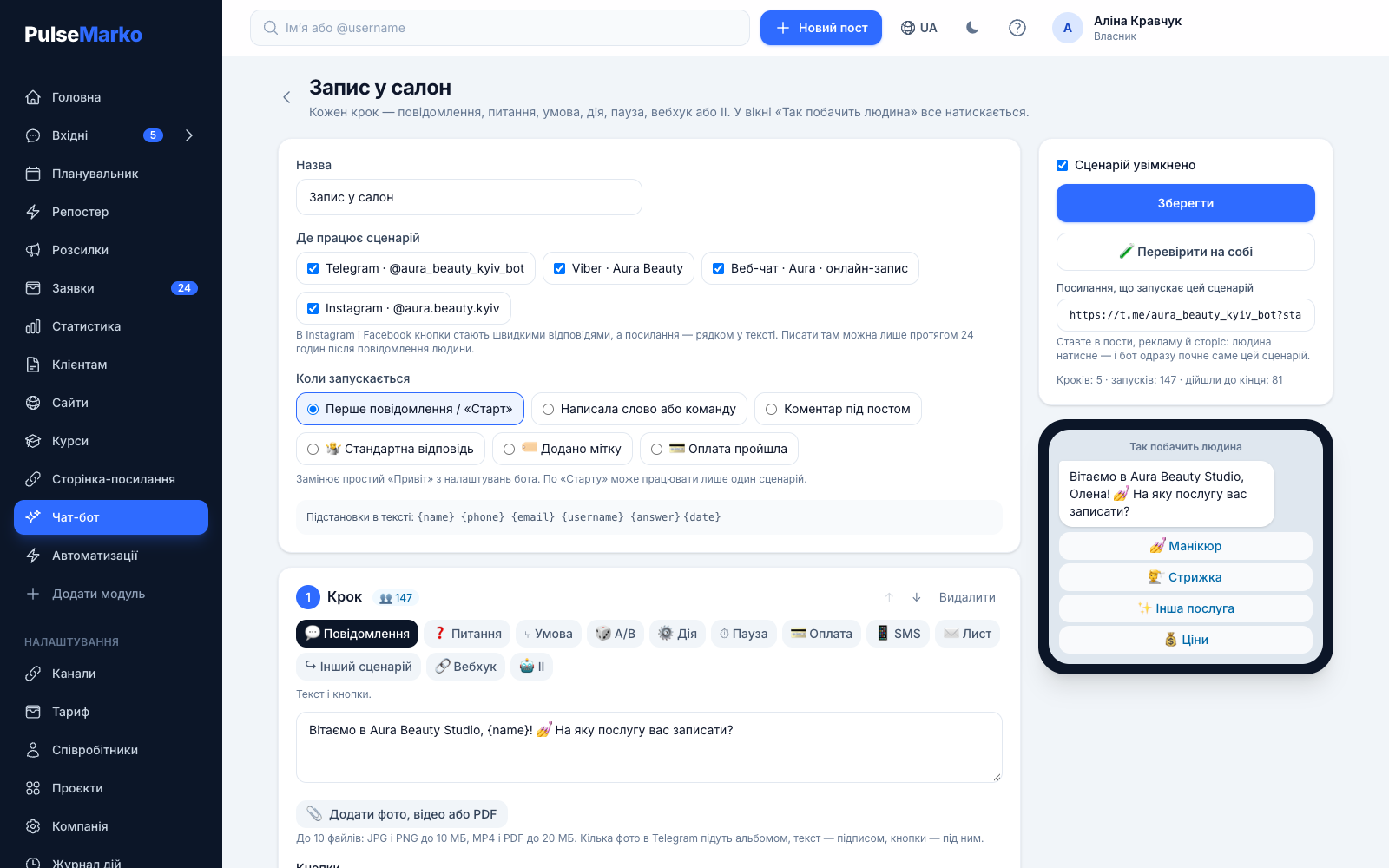
What a business chatbot does
Small business owners get the same messages in messengers all the time: the price, the address, the opening hours, "can I book for Saturday". The bot answers these questions itself and passes you the request with a phone number.
A client writes in the evening, you answer in the morning, and they have already bought from your neighbor.
In PulseMarkoA flow with the "Wrote a word or command" trigger: a person writes "price" or "price list" and immediately gets the list of services, up to 10 photos and a "Leave a request" button.
Someone dictated a phone number in Viber, someone else in Telegram, and half of the numbers stayed buried in the conversation.
In PulseMarkoThe "Question" step checks that the answer looks like a phone number (+380…) or an email, saves it to the contact card, and with the "Send me in Telegram" box ticked it forwards it to you right away.
The person is ready to pay but waits while a manager looks for the card number.
In PulseMarkoThe "Payment" step shows a "Pay" button in the chat. After payment the bot writes "Payment received" with the order number, adds the "paid" tag, and the order shows up in "Leads".
Someone opened an invoice and didn't pay. Nobody has time to write to each person separately.
In PulseMarkoThe "Payment with reminder" template: after 2 hours the bot checks whether the payment went through and reminds only those who haven't paid, once.
Where the bot works: Telegram, Viber and website chat
You write a flow once and turn it on for several channels at the same time. You don't need to build a separate bot for each messenger.
Telegram
Buttons look like inline buttons under the message. Several photos go as an album, and the text becomes the caption. A link like t.me/your_bot?start=… starts a specific flow.
Viber
The bot is connected in "Channels". Buttons are shown as regular Viber buttons, and each file arrives as a separate message, followed by the text with the buttons.
Website chat
The same flow answers in the widget on your website, and the widget draws the buttons itself. The widget is a separate module: website chat with a bot, free for 1 site and 100 conversations a month.
Instagram, Facebook and WhatsApp are still in development in PulseMarko: you will be able to connect them after the app passes Meta's review. Once they launch, Meta's rule will apply there: the bot can write only within 24 hours after the person's message, and buttons become quick replies.
How to create a chatbot without a programmer
The template already has steps and buttons. Your part is to replace the texts and prices with your own.
Connect a channel
Create a bot in Telegram through @BotFather and paste its token in "Channels". Viber is connected in the same place.
Pick a template
Go to "Bots" → "Start from a template" or "New flow". Change the texts, prices and buttons to your own, and add or remove steps as you need.
Test it and turn it on
Walk through the flow in the "What the person will see" window, then press "Test on yourself" to receive it in your own messenger. After that tick "Flow enabled".
There is also a "Describe the bot in words" button: you write what the bot should do, and AI builds a draft flow. It works on a paid tier of the AI module or during the 14-day trial, up to 20 attempts a day.
Ready-made flows: booking, requests, payment
The "Start from a template" window has 13 templates. Each one opens in the editor, so you can see right away which steps it is made of.
- Menu and request
- Price list by keyword
- Booking
- Beauty salon
- Car service
- Food delivery
- Shop
- Online course with payment
- Payment with reminder
- Review
- Giveaway
- Promo code and reminder
- Telegram and client phone
The booking bot here is simple: it asks for the service, the preferred date and time as text, and a phone number, and you get a notification. There is no calendar of free slots for your staff, so you or an administrator confirm the booking.
For an online store there is the "Shop" template: new arrivals, discounts and a request to a manager. In the "Review" template the person gives a rating. On 4 to 5 the bot asks for a review, and on a lower rating it hands the conversation to a manager.
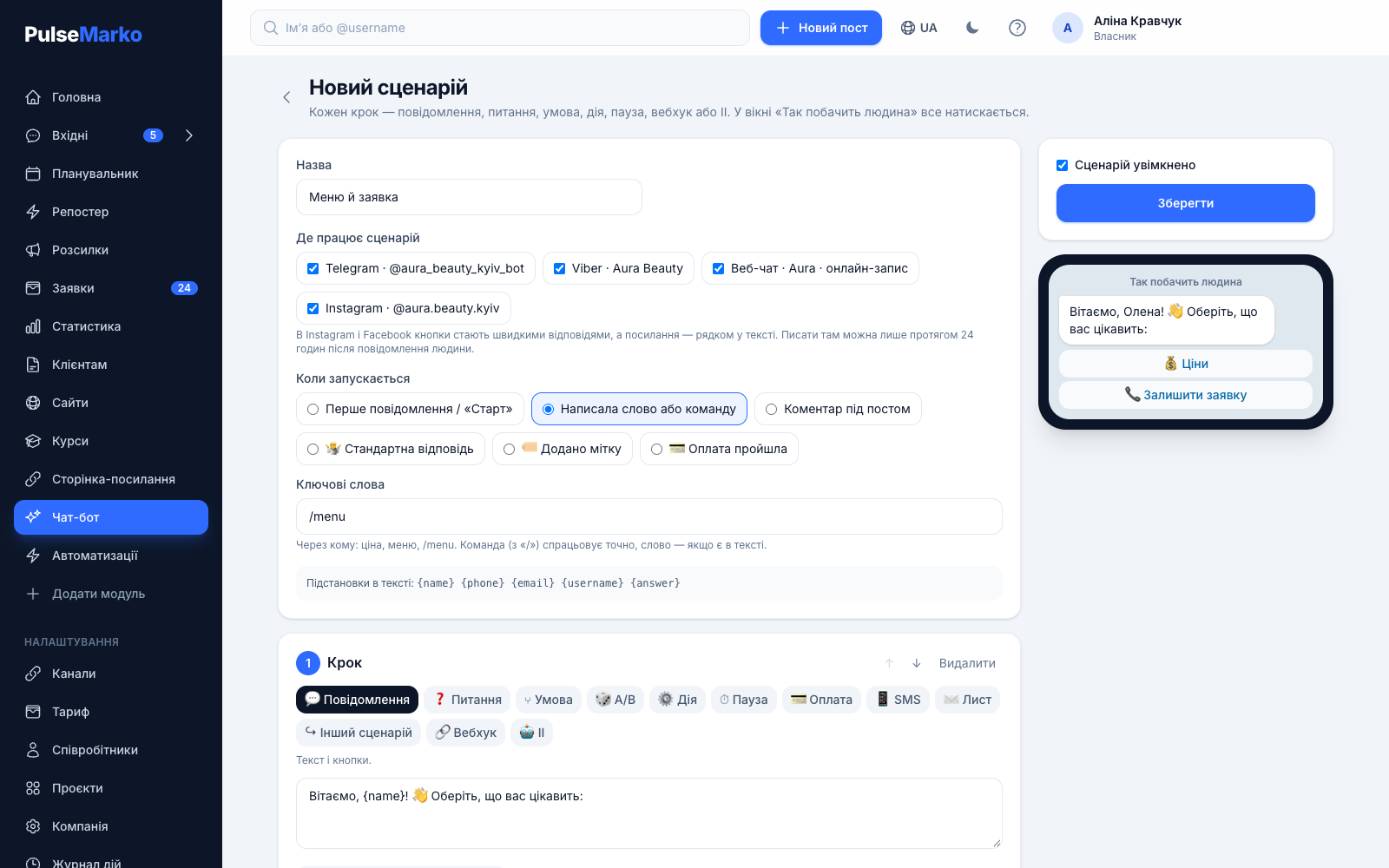
What a flow is made of
A flow has up to 30 steps, with up to 8 buttons under each message. The step types are:
- Message
- Question
- Condition
- Action
- Pause
- Webhook
- AI
- Another flow
- A/B
- Payment
- SMS
When it starts
The first message or "Start". A word or a command: the bot compares a command starting with "/" exactly, and looks for a word inside the text, where upper and lower case don't matter. "Default reply" fires when nothing else matched. There are also "Tag added" and "Payment completed", for sending access or offering something extra after payment.
Variables and placeholders
You can insert {name}, {phone}, {email} or any variable of your own from a "Question" step into the text. The "Condition" step sorts people by tags and values: equals, contains, greater than, less than, filled in.
Photos, video, PDF
You can attach up to 10 files to a message: JPG and PNG up to 10 MB, MP4 and PDF up to 20 MB. A message can consist of files only, for example a photo of the menu.
Pauses and reminders
The "Pause" step delays the next message by a set number of minutes. This is how you do a promo code reminder after a day or a reminder about an unpaid order after 2 hours.
Google Sheets, CRM, Make
The "Webhook" step sends a POST with JSON: name, @username, phone, email, tags and variables. A value from the response can be saved to a variable, for example an order number. Paid tiers of the module include an API for launching a flow from your own website or CRM.
Change history
Every save goes into the "Change history". If the bot started answering wrongly after your edits, the "Restore" button rolls back to the previous version, and the current one stays in the history too.
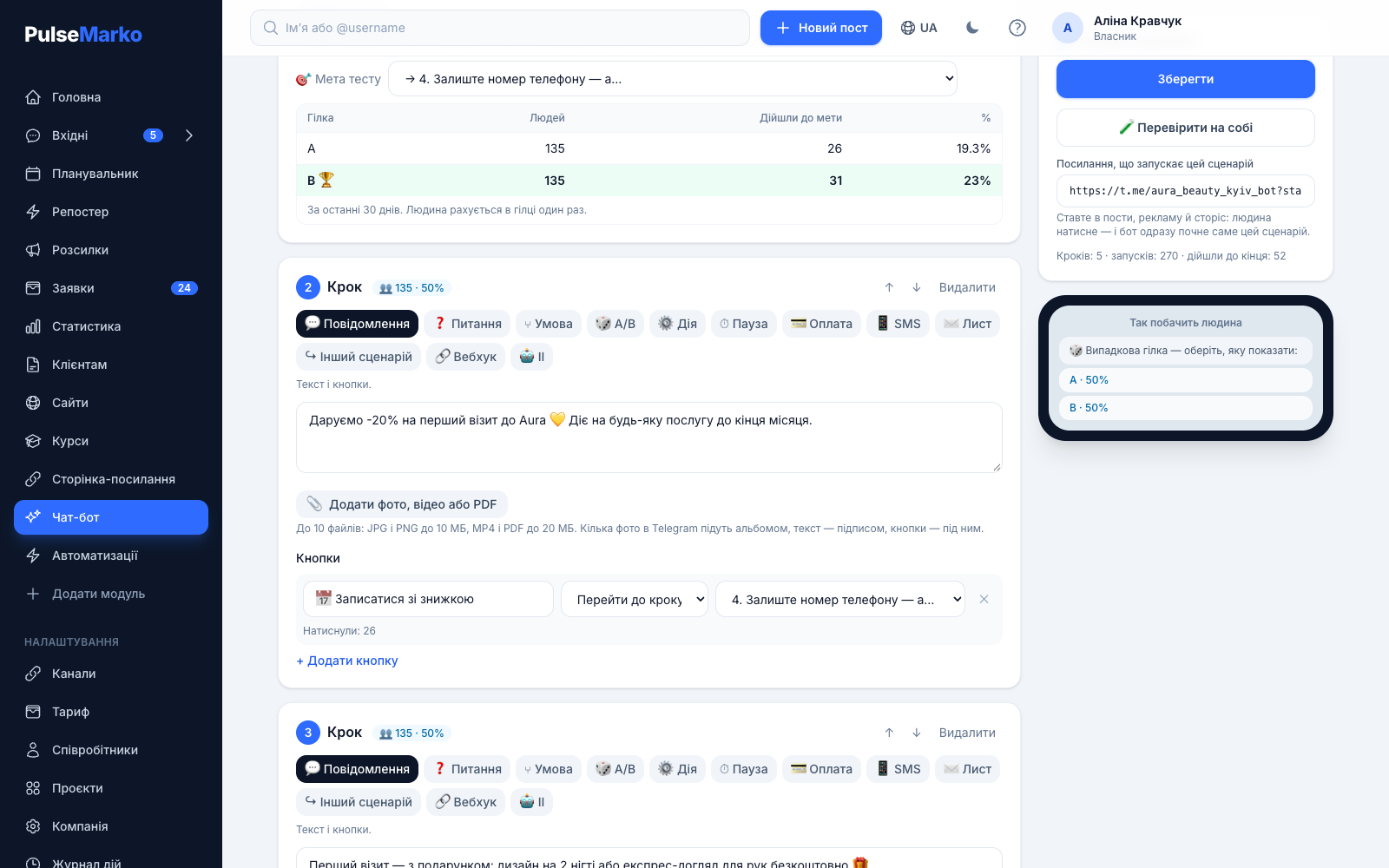
Funnel and A/B test in the editor
Under each step you can see how many people reached it in the last 30 days and what share that is of the first step, and under the buttons there is a "Pressed" counter. These numbers show the step where your messenger funnel loses people.
The "A/B" step randomly splits people between branches in the proportion you set, for example 50 to 50. You choose the goal of the test yourself: "Order payment" or any step of the flow. While a branch has fewer than 100 people, the report says "not enough data" and does not name a winner.
When the bot hands the conversation to a person
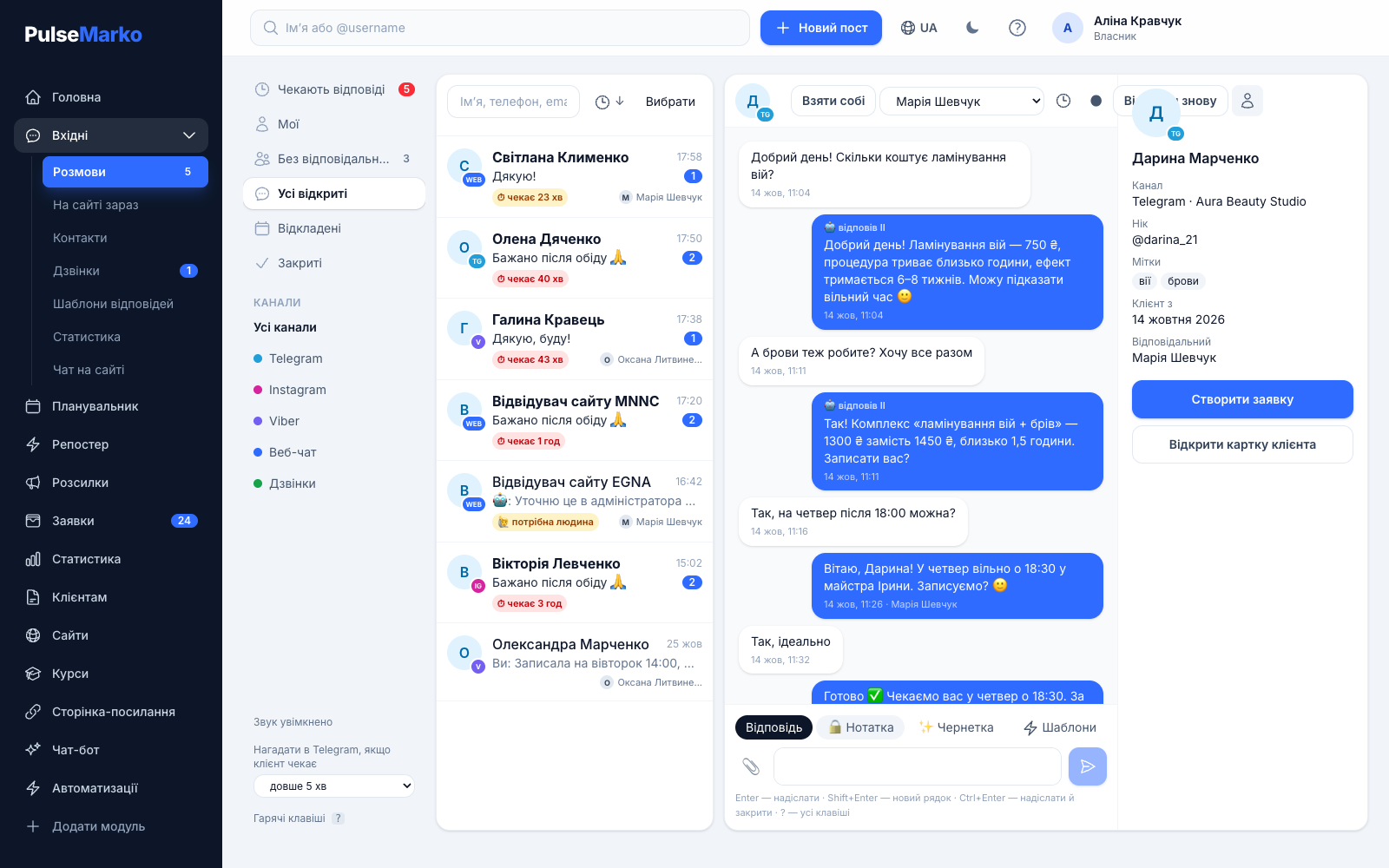
The conversation with the bot is visible in "Inbox" next to your other chats, so a manager sees what the client has already chosen and which details they left. You can reply there as well: all chats in one window.
"Default reply" and the AI assistant stay silent if a manager wrote to this person in the last 30 minutes. The default reply also goes to one person no more than once every 5 minutes.
The "AI" step answers free-form questions from a knowledge base that you fill in yourself. If something isn't there, it doesn't make it up and calls a manager. For this step you set the words that hand over to a manager. Replies are counted in the AI module: 50 a month for free, more on the page AI answers from a knowledge base.
How much a chatbot costs
The price depends only on the number of subscribers, the same way SendPulse counts. A subscriber is a person who wrote to your bot in Telegram or Viber and has not blocked it. Website chat visitors are not included. On paid tiers messages are unlimited.
Free
- 500 subscribers
- 10,000 bot messages a month
- All step types and templates
Up to 1,000 subscribers
- Unlimited messages
- API for launching flows
- A year costs the same as 10 months
Up to 5,000 subscribers
- Unlimited messages
- API for launching flows
- A year costs the same as 10 months
| Subscribers | $ per month | ≈ ₴ |
|---|---|---|
| 2,000 | $17.49 | ≈ ₴785 |
| 10,000 | $58.99 | ≈ ₴2,655 |
| 20,000 | $94.99 | ≈ ₴4,275 |
| 50,000 | $174.99 | ≈ ₴7,875 |
| 100,000 | $339.89 | ≈ ₴15,295 |
| 1,000,000 | $2,571.89 | ≈ ₴115,735 |
What to know before you start
- Instagram, Facebook and WhatsApp are in development until Meta reviews the app. Starting a flow from a comment under a post will also work only after that. TikTok in PulseMarko connects only to the post planner and is also waiting for TikTok's review. There is no bot there.
- When the 10,000 messages of the month run out on the free tier, the bot in Telegram and Viber stops answering until the 1st of the next month, while operators can write as usual. If you have more subscribers than your tier allows, the bot is paused and a warning appears in your account.
- For "Start", only one flow works in a channel. The others are launched by words, by a link or from another flow.
- The booking bot does not show your staff's free time: it collects wishes and a phone number, and a person confirms the booking.
- There are no ready-made integrations with specific CRMs. Data is passed through a webhook, Make, Zapier or the API.
- The "Tag added" trigger reacts to tags set by the "Action" step or by payment. A tag set manually in "Inbox" does not start a flow yet.
- Rakuten Viber charges its own fee for messages from bots created after 5 February 2024. Viber collects it, not PulseMarko. Before launch, check the current terms in Viber for Business.
Frequently asked questions
What is a chatbot and what is it used for?
A chatbot is a program inside a messenger that answers by a script you wrote in advance: it shows buttons, asks questions and saves the answers. Small businesses use it for price lists, taking requests, booking clients, taking payment for orders and reminders.
How do I create a chatbot without a programmer?
Connect a Telegram bot or Viber in "Channels", open "Bots" and pick a template under "Start from a template". Change the texts and prices, test the flow with the "Test on yourself" button and turn it on. You don't need to write any code.
How much does a chatbot cost?
It is free for up to 500 subscribers and 10,000 bot messages a month, with no time limit. That is enough for a small business to work with. Once you have more than 500 subscribers you need a paid tier: from $9.49 a month (≈ ₴425) for 1,000 subscribers, with unlimited messages. A year costs the same as 10 months.
Is there a free chatbot builder and what are its limits?
Yes, the free tier of the Bots module has no end date. There are two limits: 500 subscribers and 10,000 bot messages a month. Replies in the website chat do not count toward this limit, because the web chat counts conversations. All step types and templates are available. The API is only on paid tiers.
How do I make a bot that books clients?
Take the "Booking" or "Beauty salon" template. The bot asks for the service, the date and time, and a phone number, and you get a notification in Telegram. The bot does not show free slots of your staff, so you confirm the booking yourself.
Can I take payment right in the chat?
Yes, with the "Payment" step. First add your monobank token or WayForPay keys on the "Link page" page. The money goes to your account. After payment the bot writes "Payment received", adds the "paid" tag, and the order appears in "Leads".
How do I connect a chatbot to Viber and who pays for messages?
A Viber bot is connected in "Channels", after which you can tick it in any flow. PulseMarko only counts subscribers against your tier. Rakuten Viber itself charges for messages from bots created after 5 February 2024, so check its terms separately.
What happens if a client writes a word differently from the one in the settings?
The bot looks for a regular word inside the message and ignores letter case, so "What's the PRICE?" triggers on the word "price". A command starting with "/" must match exactly. The bot does not recognize typos in a word. For those cases there is the "Default reply" trigger.
How do I get subscribers for the bot?
Every flow has a "Link that starts this flow". You put it in posts, ads, stories and on your website. A person taps it, opens the bot and lands straight in the right flow. People who have already subscribed can get a broadcast to bot subscribers.
Can I move a person from one flow to another?
Yes, with the "Another flow" step or a button that leads to another flow. You can also add a tag with the "Action" step: if there is a flow with the "Tag added" trigger for it, the bot switches to that flow. A limit of 12 jumps in a row protects against endless loops.
Build your first bot from a template
After sign-up, connect a Telegram bot, open the "Menu and request" template and put in your prices.
Start for free500 subscribers and 10,000 bot messages a month for free.