Broadcasts module

Customer broadcasts in Telegram, Viber, SMS and email

The PulseMarko broadcast service puts all channels in one account. Telegram and Viber broadcasts go to the subscribers of your bot, SMS go through your TurboSMS account, and emails are sent from our mail server or from your SMTP. You write the text and choose who gets it. Messages are sent in batches every minute, and the broadcast page shows how many were delivered and how many link clicks there were.

The free tier has no time limit: 1,000 broadcast messages per month, including up to 300 emails from our mail server. SMS are paid directly to TurboSMS at their rates.

  • Telegram bot
  • Viber bot
  • SMS through TurboSMS
  • Email
  • WhatsApp: waiting for Meta approval
What gets in the way

Customer broadcasts without manual work

Four typical situations in a salon, shop or studio, and what the module offers for each.

"I send every promo to each person on Viber separately"

An hour for a hundred messages, and someone still falls off the list.

In PulseMarko

One broadcast goes to all bot subscribers or only to those with the labels you need, for example #vip. Instead of {name} each person sees their own name.

"I don't know if anyone clicked the link"

The broadcast went out, and what happened next is unknown.

In PulseMarko

The "Count link clicks" checkbox shortens links and adds UTM tags. After sending, the "Result" block shows clicks per link, CTR and unsubscribes.

"SMS in one service, the bot in another, email in a third"

You have to move contacts between accounts by hand.

In PulseMarko

You pick the channel in the "Channel" field of the "New broadcast" form. Contacts are shared: a person who wrote to the bot or left a phone number in the website chat lands in the same database.

"I'm afraid SMS will be seen as spam"

Complaints mostly come from people who never wrote to you.

In PulseMarko

An "Unsubscribe" link is added to SMS by default. Before sending, you see how many recipients have never chatted with you, and you can keep only those who wrote first.

Channels

Mass messaging: what works in each channel

Every messenger has its own rules. Below: who receives the message and what you pay for separately.

Telegram broadcast: who receives it

The message goes to people who started your bot and have not blocked it. You cannot send a Telegram broadcast by phone numbers or to a purchased list: Telegram does not let bots write first.

  • JPG or PNG image up to 5 MB, caption up to 1,024 characters;
  • up to 3 link buttons under the message;
  • anyone who blocks the bot is marked as unsubscribed and gets nothing more.

Subscribers appear when people write to your chatbot for Telegram and Viber.

Viber broadcast through a bot

A Viber broadcast goes to the subscribers of your Viber bot. These are not business messages from an alpha name, for which providers sell separate packages. Viber charges for messages the bot sends first, and before sending the page shows how many such messages may be paid.

  • image up to 1 MB, caption up to 768 characters;
  • up to 3 link buttons.

SMS broadcast through TurboSMS

Under "Channels", paste the token and alpha name from your turbosms.ua account. When you connect, PulseMarko checks access and shows your balance. You pay TurboSMS for SMS directly, we do not resell them.

  • a part counter right in the form: 70 characters in one SMS in Cyrillic, 67 per part in longer ones; 160 and 153 in Latin;
  • before sending: "N recipients × K SMS", an estimated cost and a warning if the balance is not enough;
  • one number receives one SMS, even if it is saved in several contacts.

Email broadcast: our mail server or your SMTP

An email has a subject and a text with paragraphs and links. Every email has "Unsubscribe" at the bottom, and mail services see a one-click unsubscribe header.

Through our mail server you can send 300 emails per month for free, 3,000 on "Basic" and 15,000 on "Pro". If you set your own SMTP (for example Gmail or Ukr.net), there is no separate email limit, and only broadcast messages are counted. When the limit for emails through our mail server runs out, the remaining emails of that broadcast get the status "Failed".

WhatsApp waiting for Meta approval

You will be able to connect WhatsApp after Meta approves PulseMarko. There you can only write first with an approved template, so the form already has the fields "WhatsApp template name", "Language" and three variables. Meta charges for each template at its own rates.

Instagram and Facebook waiting for Meta approval

There are no mass broadcasts in Direct and Messenger, because Meta prohibits them. Connecting these channels is also waiting for Meta approval. Customer replies from them will be collected in the same Inbox together with replies to your broadcasts.

Recipients

Who to send to: labels, variables, activity

If you select nothing, the message goes to all subscribers of the channel. For SMS and email that means all contacts with a phone or email who have not unsubscribed.

Labels

Tick the labels you need in the "To" block. Contacts that have all the selected labels at once will receive the message.

Variable from scenarios

If the bot asks for a city or a size, the answer is stored in a variable. The filter condition is "is filled", "equals" or "contains". This way you can write only to customers from Kyiv.

Activity

The "Wrote to the bot in the last N days" field accepts 1 to 365. For SMS and email there is an "Only those who wrote to you first" checkbox.

These filters open with the "More conditions: variable, activity" button. Before sending, the page shows the exact number of recipients.

Launch

How to send a broadcast in 3 steps

Connect a channel

Under "Channels", add a Telegram or Viber bot, TurboSMS or email. A bot needs a token, and SMS also needs an alpha name.

Write the message

"New broadcast": channel, recipients, text. For Telegram and Viber you can add an image and buttons. Click "Next: review".

Check and send

See how subscribers will see it. For Telegram, SMS and email there is a "Send test to myself" button. Then "Send now" or "Schedule" for a date from one minute to 60 days ahead, in your business time zone.

For a scheduled broadcast, the recipient list is built at the moment it starts, so new subscribers get it too. You can cancel the schedule, and the broadcast becomes a draft again.

During and after sending

Pause, cancel and broadcast statistics

Messages go out in batches once a minute. While a broadcast is running, you can stop it with the "Pause" button and resume it with "Continue". "Cancel the rest" removes from the queue those who have not been sent to yet, and those messages are not counted against your limit.

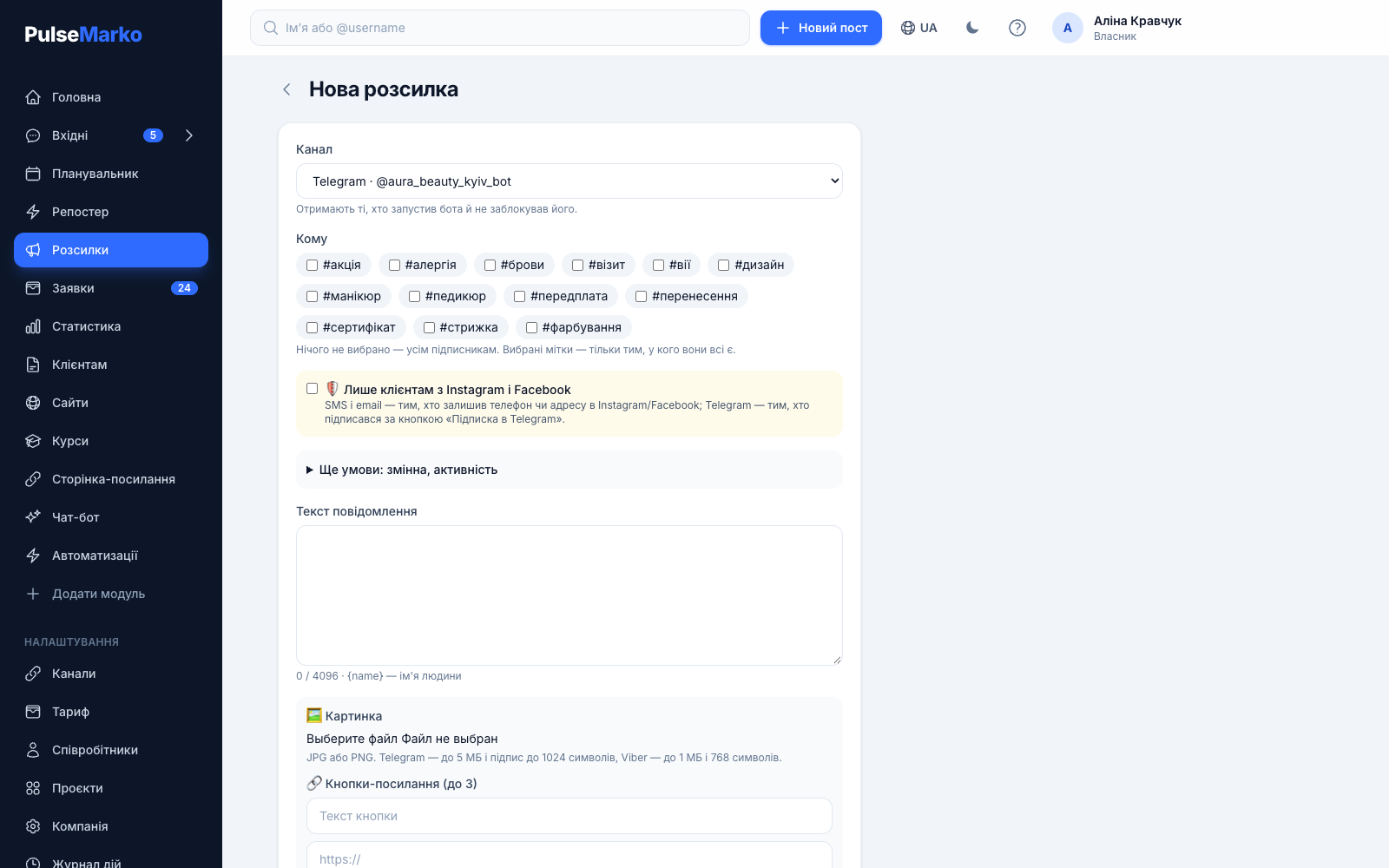
The New broadcast form in PulseMarko: channel choice, recipient labels, text and buttons
The "New broadcast" form: channel, recipients, text and buttons. The send time is set on the next step.
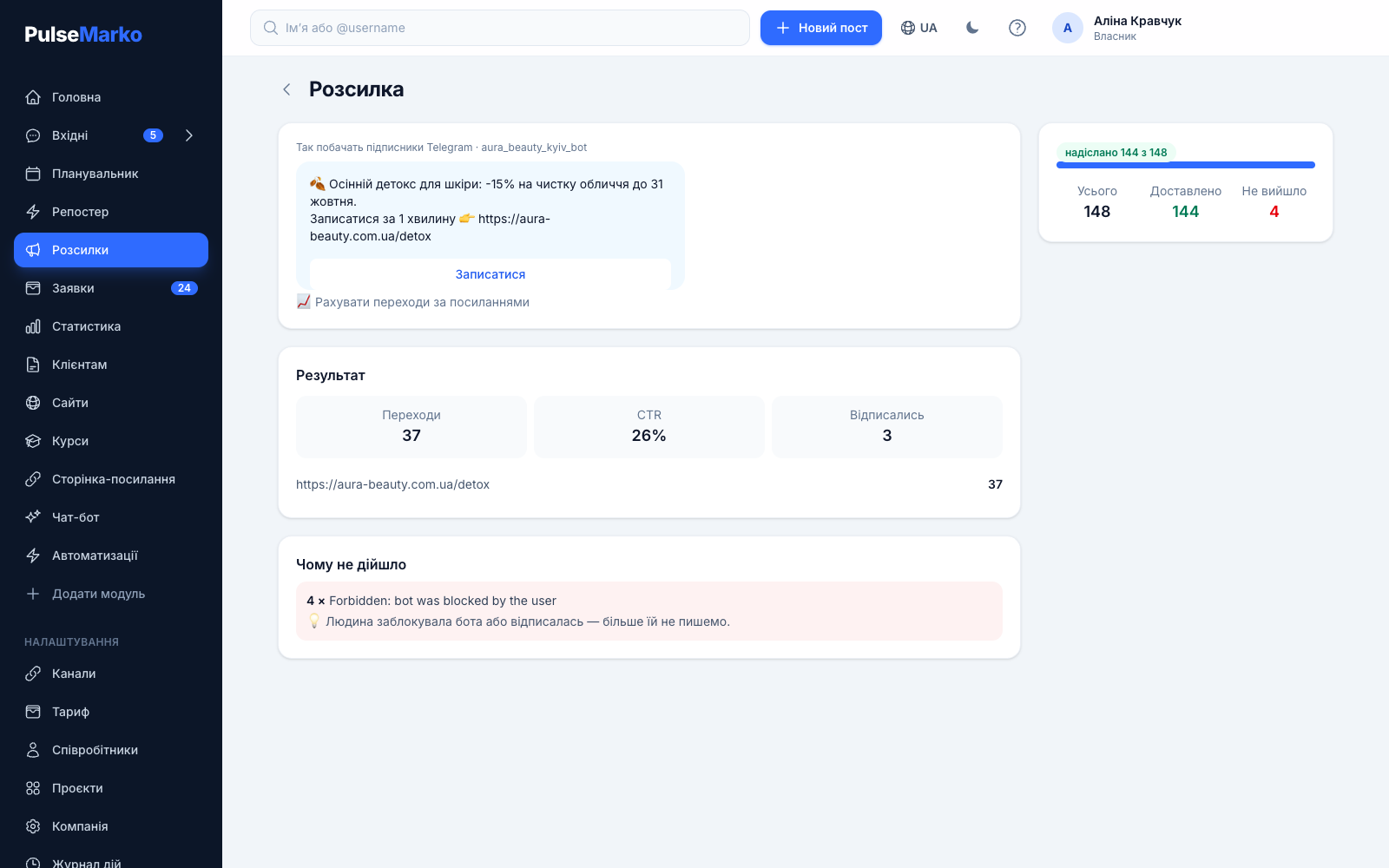
A broadcast page in PulseMarko with statistics: delivered, clicks and unsubscribes
Broadcast statistics: how many were delivered, how many clicks there were and how many people unsubscribed.

What the "Result" block shows

Total, "Delivered" and "Failed". CTR is clicks divided by delivered messages. Clicks per link and the number of unsubscribes from emails and SMS are shown separately. If click counting is on, links get utm_medium=broadcast, the channel name in utm_source and the broadcast number in utm_campaign. Your own UTM tags are not overwritten.

Why it was not delivered

The page shows up to five of the most common reasons with a hint for each. For example, the person blocked the bot, the TurboSMS balance ran out, the service did not accept the token or the number is written with an error. If the TurboSMS balance runs out in the middle of a broadcast, the remaining SMS get the status "Failed", so check the balance warning before sending.

Prices

How much the Broadcasts module costs

PulseMarko modules are bought separately, so you pay for broadcasts only when the free tier is no longer enough. The limit counts every message sent in any channel, even if it was not delivered. A test to yourself does not use the limit, and the number of subscribers does not affect the broadcast price.

Free

$0 / mo
no time limit
  • 1,000 broadcast messages per month
  • 300 emails from our mail server
  • All channels and filters
Start for free

Basic

$3.29 / mo
≈ 148 ₴
  • 20,000 broadcast messages per month
  • 3,000 emails from our mail server
  • All channels and filters
Start for free

Pro

$8.79 / mo
≈ 396 ₴
  • 100,000 broadcast messages per month
  • 15,000 emails from our mail server
  • All channels and filters
Start for free
Yearly paymentCosts as much as 10 months: $32.90 (≈ 1,481 ₴) for "Basic", $87.90 (≈ 3,956 ₴) for "Pro".
Several modulesTwo paid modules give a 15% discount, three or more give 25%.
Paid separately from PulseMarkoSMS are paid to TurboSMS, the first messages from a Viber bot are paid to Viber, WhatsApp templates are paid to Meta.

Hryvnia amounts are approximate, at about 45 ₴ per $1. If the monthly limit runs out in the middle of a broadcast, the remaining messages wait for the next month or for an upgrade to a higher tier. Emails from our mail server work differently: when their limit runs out, the remaining emails get the status "Failed", so for large email broadcasts it is better to connect your own SMTP.

Limits

What to know before you start

  • There is no CSV import. Contacts appear when people write to your bot or leave a phone or email in the website chat. Requests from forms on the link page or the website do not go into the broadcast database.
  • Telegram and Viber broadcasts reach bot subscribers only. Messengers do not allow writing to people who never started the bot.
  • Email broadcasts send a plain text email. There is no email builder, no templates, no A/B tests and no open statistics.
  • Viber broadcasts go from a bot, not from the company's alpha name.
  • Instagram, Facebook and WhatsApp are waiting for Meta approval, TikTok is waiting for TikTok approval. Until then these channels cannot be connected.
  • The delivery log of individual messages is kept for 90 days, after that only the summary counters remain.
FAQ

Questions about broadcasts

How do I send a Viber broadcast?

Create a Viber bot, connect it under "Channels" and collect subscribers: a person becomes a subscriber when they write to the bot. Then open "New broadcast", choose the Viber bot in the "Channel" field, write the text, add an image up to 1 MB and up to 3 buttons if you need them, and click "Next: review" and "Send now".

How much does a Viber and SMS broadcast cost?

In PulseMarko you can send 1,000 broadcast messages per month for free. Beyond that, "Basic" is $3.29 (≈ 148 ₴) for 20,000 messages and "Pro" is $8.79 (≈ 396 ₴) for 100,000. Viber separately charges for messages the bot sends first, and SMS are paid to TurboSMS at their rates. Before an SMS broadcast starts, the page shows the number of SMS and an estimated cost.

Can I send a Viber broadcast for free?

The PulseMarko limit on the free tier is 1,000 messages per month. Viber itself charges for messages the bot sends first, so a Viber broadcast will not be completely free. Before sending, the page shows how many messages may be paid.

How do I send a broadcast to all subscribers of a Telegram bot?

In the "New broadcast" form choose your Telegram bot and do not select any label: then the message goes to everyone who started the bot and has not blocked it. Before sending you see the exact number of recipients, and the "Send test to myself" button sends it to you in Telegram if you turned on notifications through this bot.

Can I send a Telegram broadcast by phone numbers?

No. Telegram lets a bot write only to people who started it themselves. If you have a list of phone numbers, an SMS broadcast through TurboSMS fits, and the SMS can include a link to your bot.

How do I register a sender name for SMS?

An alpha name is registered in your TurboSMS account under their rules. After registration, paste the token and this name (up to 11 characters) into PulseMarko under "Channels", and SMS will arrive from that name.

How do I insert the customer's name into the broadcast text?

Write {name} where the name should go, for example: "{name}, here is 15% off until Sunday". Each recipient sees their own name from the contact card.

Do I need customers' consent for a broadcast?

Write to people who gave you their contact themselves or subscribed to the bot. For promotional SMS keep the "Unsubscribe" link, which is added by default. Emails always include an unsubscribe link, and in the contact card you can manually turn off SMS broadcasts or email broadcasts for a specific person.

What is better for customer broadcasts: SMS or Viber?

SMS reaches any number, but every part of the message costs money at TurboSMS. A Viber bot broadcast reaches only subscribers, but it supports an image and buttons. You can combine the channels: send an SMS with a link to the bot first, and then write in the messenger.

Does the broadcast price depend on the number of subscribers?

No. The Broadcasts module counts sent messages: 1,000 per month free, 20,000 for $3.29 and 100,000 for $8.79. Bot subscribers are counted separately by the Bots module: free up to 500, then from $9.49 per month per 1,000. If you have more subscribers than your Bots tier allows, the bot stops replying automatically, while broadcasts keep going within the Broadcasts limit.
Try it on your own bot

Connect a bot or TurboSMS, write the text and send a test to yourself. The free tier gives 1,000 messages per month with no expiry.

Start for free