Scheduled posting: posts go out by themselves, right on time
You write a post ahead of time, set a date and time, and click "Schedule". At the right minute PulseMarko publishes it to your Telegram channel or group. Auto-posting to Instagram, Facebook Pages and TikTok is already built, but it opens for everyone only after Meta and TikTok review.
The free plan has no time limit: 3 accounts and 30 posts per month. For the first 14 days after sign-up all modules are open.
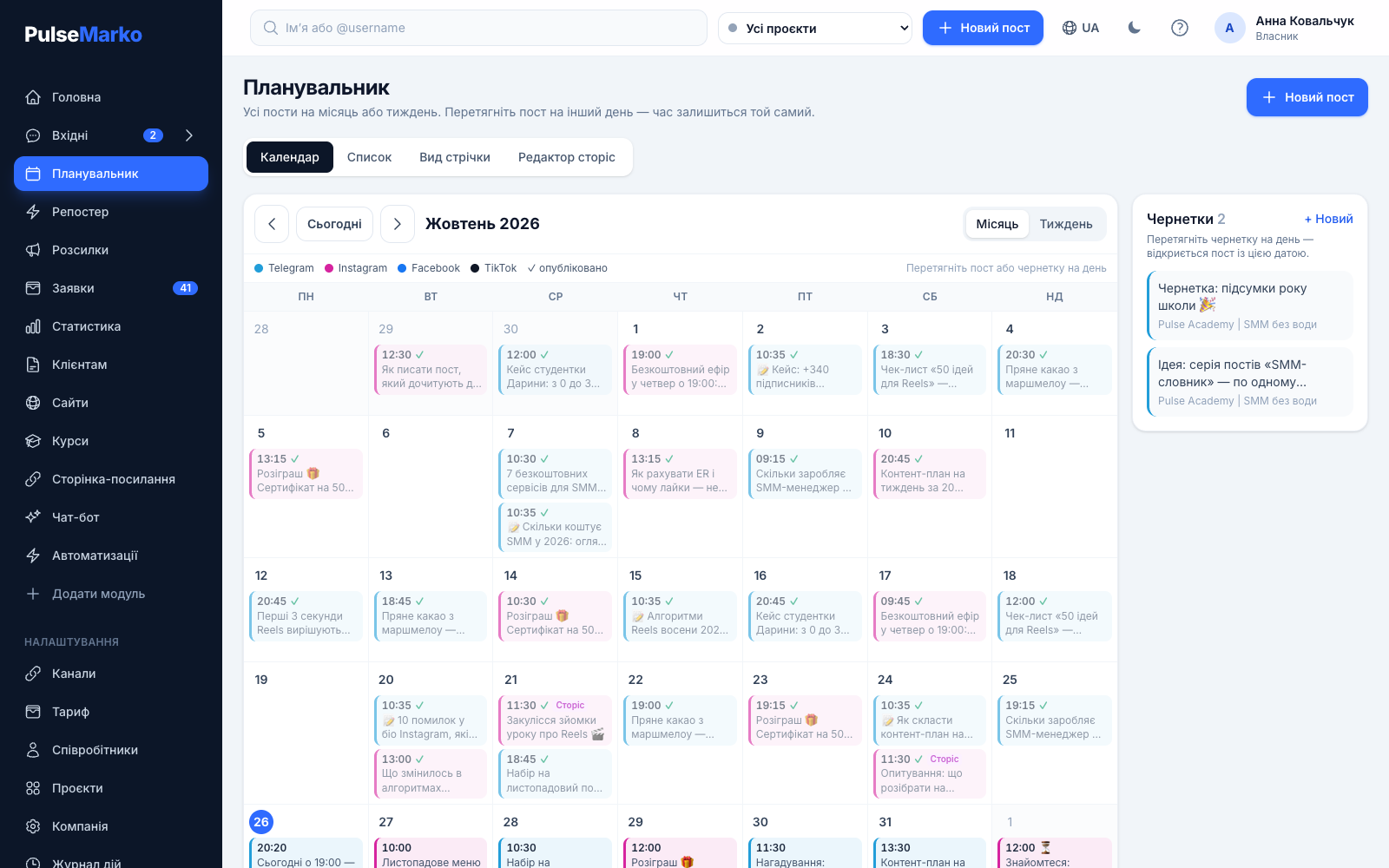
Write once, and the post goes out by itself
An auto-posting service is for people who run a business channel or page between other tasks. Below are four typical situations and what PulseMarko does about them.
The post must go out at 9:00, and you are on the road
The queue is checked every minute. Time is counted in your company's time zone, so the difference with the server does not matter.
One text has to go to several channels
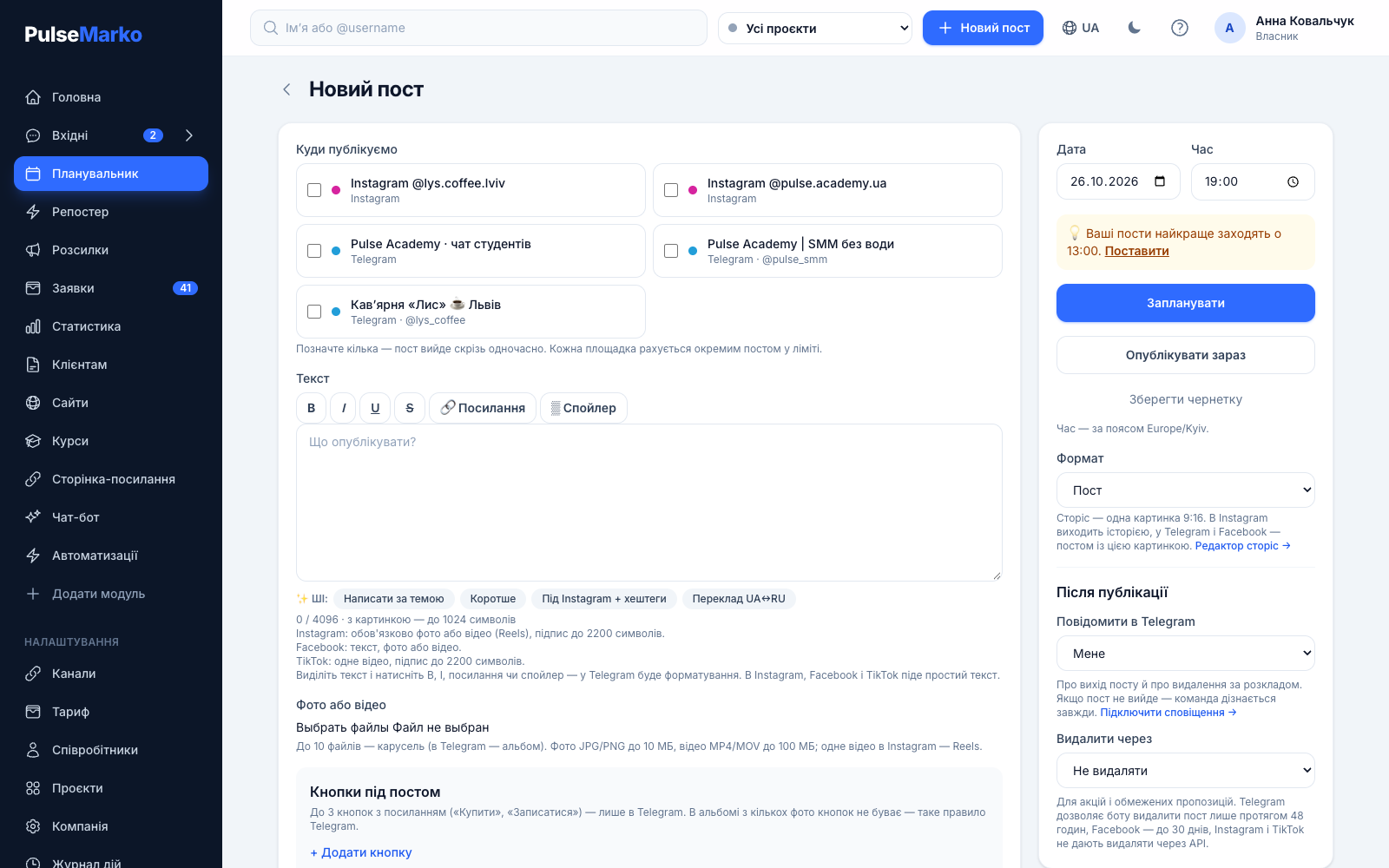
In the "Where to publish" block you tick several platforms. Each gets its own copy of the post, and you can edit all copies together or just one.
The discount post stays up after the deadline
The "Delete after" option removes it by itself: in Telegram up to 47 hours after posting, on a Facebook Page up to 30 days. Available from the Basic plan.
A post did not go out, and nobody noticed
The post gets an "error" status with the reason, and a notification arrives in Telegram. The team learns about the failure even when regular notifications are off.
Your first scheduled post in three steps
Connect a Telegram bot
Create a bot in @BotFather with the /newbot command, copy the token into the "Channels" section and click "Connect".
Add a channel for posts
Make the bot an admin of your channel or group with the right to post. Then enter the channel link or @name under "Channels for posts".
Schedule a post
Open "Planner", then "New post". Write the text, add up to 10 photos or videos, pick a date and time, and click "Schedule".
You can save a post as a draft or click "Publish now" right away.
Auto-posting to Telegram, Instagram, Facebook and TikTok
The form checks each network's rules before saving. If something does not fit, you see which platform and why, and the post is not saved partially.
Telegramworks
- Channels and groups where your bot is an admin.
- Text up to 4096 characters, a picture caption up to 1024.
- An album of up to 10 photos or videos.
- Bold, italic, links, spoiler, up to 3 buttons under a post, pinning in the channel.
Instagramin development
- A post with only photos or video, caption up to 2200 characters.
- A carousel of up to 10 files, and a single video is published as a Reel.
- A story from one 9:16 picture.
- You sign in on Instagram's own page, and you do not give us your password.
Facebookin development
- Business Pages. Groups are not supported.
- Text, photo or video.
- Several files in one post work only for photos.
TikTokin development
- One MP4 or MOV video, caption up to 2200 characters.
- Until the app passes the TikTok audit, only you can see the published video.
Photos in JPG or PNG up to 10 MB, videos in MP4 or MOV up to 100 MB. The scheduler does not support Threads, YouTube, Viber channels or LinkedIn.
What is in the "New post" form
Above the text there is a toolbar with B, I, U, S, "Link" and "Spoiler". In Telegram the post goes out with formatting. In Instagram, Facebook and TikTok it goes as plain text, and the link address is added in brackets.
Below the text are AI buttons: "Write from a topic", "Shorter", "For Instagram + hashtags", "Translate UA↔RU". Each generation is taken from the limit of the AI module, which is 50 per month on the free plan. The AI does not make up prices or dates that are not in your text, but it is worth rereading the result.
- Up to 3 link buttons under a post in Telegram, for example "Buy" or "Sign up". An album of several photos cannot have buttons, that is a Telegram rule.
- A "Pin in channel after publishing" checkbox. If the bot has no right to pin, the post still goes out, and the card shows a hint.
- UTM tags for links: utm_source by network, utm_medium=social, and you write the campaign yourself. The text in the scheduler does not change, tags are added at sending.
- Short links with a click counter, so you can see which post brings people to the site.
- "Notify in Telegram": me, the whole team or nobody.
Calendar and Instagram feed view
A calendar by month or week
All scheduled posts are on one grid, and a colored mark shows the network. A post going to several platforms takes one tile, and dragging moves all copies that have not gone out yet. It is convenient to keep as a content plan.
Drafts on the side
You can drag a draft onto a day in the calendar. The post form opens with that date, and you only need to set the time.
Feed view
The tab shows the profile as a 3-column grid: scheduled posts on top, published ones below. Drag a post with the mouse or use the ‹ › buttons, and two posts swap their publishing times.
A list with statuses
The "List" shows what is scheduled, what went out, where there is an error, and how many clicks the links in each post collected.
Stories, reposter and delete on a timer
These features open from the Basic plan at $4.99 per month.
Scheduled stories
A separate "Story editor" for one 9:16 picture. In Instagram it goes out as a story, in Telegram and Facebook as a post with that picture. Reels are scheduled through a regular post with one vertical video from 3 to 90 seconds.
Reposter
The source is an RSS feed of a site or blog, or your Telegram channel. RSS is checked once every 10 minutes, and a new post from a channel is picked up right away. On the first check old entries are not published, only new ones.
Delete on a timer
For sales and limited offers. Telegram lets a bot delete a post only within 48 hours, so the maximum there is 47 hours. On a Facebook Page it is up to 30 days. Instagram and TikTok do not allow deleting through the API.
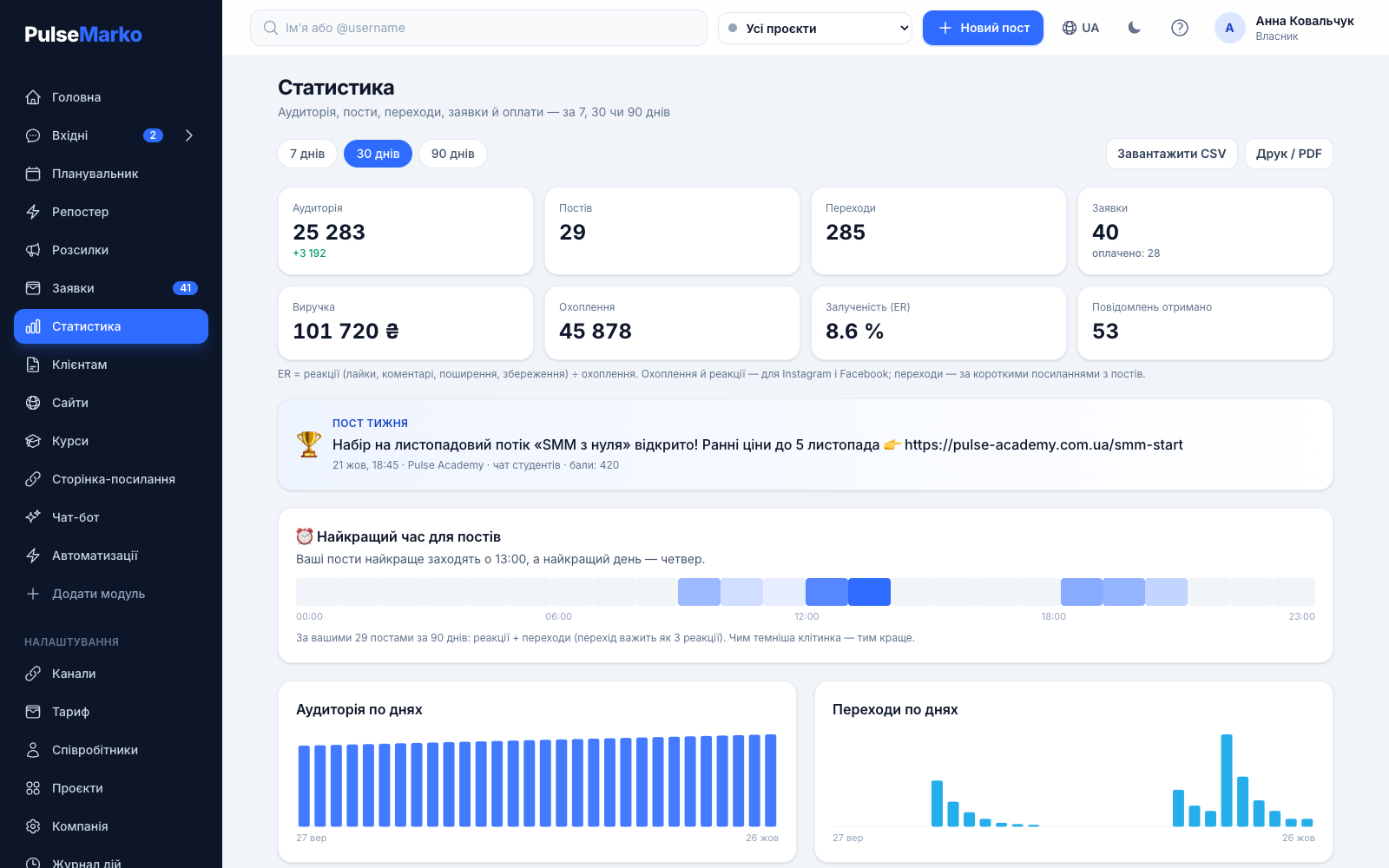
Post statistics and the best time to publish
The "Statistics" section shows data for 7, 30 or 90 days: reach, reactions and ER for Instagram and Facebook, clicks on short links, and leads and payments by UTM campaign. There is a "Post of the week", the top 10 posts, a CSV export and PDF printing.
Once you have at least 10 published posts in 90 days with reactions or clicks, PulseMarko works out at what hour and on which day they do best. The hint appears right in the post form with a "Set" button.
Telegram does not give bots the number of post views. For channels you will see subscribers and clicks, not views. Statistics are available from the Basic plan.
How this differs from "Schedule message" in Telegram
You can schedule a post in Telegram without any service: hold the send button and pick "Schedule message". For one channel and a few posts a week, that is enough. Meta Business Suite likewise schedules posts for Instagram and Facebook.
PulseMarko is useful when there are several channels, two or three people prepare posts, or you need to know which posts bring leads. It has one calendar for the whole team, buttons under posts, UTM tags and clicks, and notifications about publishing and failures.
How much the post scheduler costs
PulseMarko modules are bought separately, so you pay only for the scheduler. Prices are in dollars, and hryvnia amounts are approximate at 45 ₴ per $1; payments in hryvnias use the current NBU rate.
Free
$0
no time limit
- 3 accounts or channels
- 30 posts per month
- Calendar, feed view, drafts
- Several platforms in one post
- Buttons, pinning and formatting in Telegram
- UTM tags and a click counter
Basic
$4.99 / mo
≈ 225 ₴ per month
- 10 accounts
- Unlimited posts
- Stories and reposter
- Statistics and best time
- Delete a post on a timer
Pro
$11.99 / mo
≈ 540 ₴ per month
- 30 accounts
- Everything in Basic
- Client projects with the roles "Manager", "Post editor", "Operator" and "View only"
What to know before you start
- Right now publishing works in Telegram. Instagram, Facebook and TikTok are in development: the code is ready, but the connection will open after Meta reviews the app and TikTok completes its audit.
- Facebook is supported only for Pages. The scheduler does not post to Facebook groups.
- Post views in Telegram are not available to bots, so channel statistics do not include them.
- Original photos and videos are deleted 7 days after publishing, and a preview stays in the dashboard. File storage: 1 GB free, 5 GB with any paid module, 20 GB on the Pro plan.
- There is no built-in graphic editor and no mobile app. The dashboard opens in a phone browser.
Frequently asked questions
How do I schedule a post in a Telegram channel?
Connect your bot in the "Channels" section, make it a channel admin with the right to post, and add the channel under "Channels for posts". Then go to "Planner", "New post", add text and files, pick a date and time, and click "Schedule". The post goes out on behalf of the channel.
How do I schedule an Instagram post with PulseMarko?
Publishing photos, carousels of up to 10 files, Reels and stories is already built, but Instagram is still in development: the connection will open after Meta reviews the app. You will need a professional account, meaning Business or Creator.
Do I have to enter my Instagram password?
No. You sign in on Instagram's own page, and we never see or store your password. Access is renewed automatically, and if it expires, the dashboard will ask you to connect the account again.
Can I schedule a TikTok post?
Yes: one MP4 or MOV video with a caption of up to 2200 characters. TikTok is in development now, and until the app passes the TikTok audit, only you can see the published video.
Can I post to Facebook groups?
No, only to Facebook Pages. The scheduler does not post to groups.
Does auto-posting hurt reach?
We have no data showing that a post sent through the official API gets fewer views. Reach is noticeably affected by the posting time and the reactions in the first hours. PulseMarko statistics show at what hour your posts get the most reactions and clicks.
What happens if a post fails to go out?
The post gets an "error" status with the reason, and a notification arrives in Telegram even when regular notifications are off. Fix the post and click "Publish now". A post will not go out twice: the queue picks up each post only once.
Can I auto-post to Telegram for free?
Yes. The free plan has no time limit: 3 accounts and 30 posts per month. Buttons under posts, pinning and the calendar are free too.
Does auto-posting replace an SMM specialist?
No. The scheduler removes the manual work of publishing, while a person still decides what to write and how to answer people. For SMM specialists there are projects with roles on the Pro plan and post approval with the client.
Schedule your first Telegram post today
After signing up, connect a bot and add a channel. You can schedule the first post right away.
Start for freeThe free plan has no time limit: 3 accounts, 30 posts per month.