Website builder for small business

Website and landing page builder with payments to your account

PulseMarko assembles a page from ready-made blocks: a first screen, products with prices, a request form, Telegram and Viber buttons, contacts with a map. The buyer clicks "Buy" and pays through monobank, WayForPay, LiqPay or NovaPay, and the money goes to the account of your sole proprietorship. Requests from the form land in the "Leads" section and in your Telegram.

Free with no time limit: 1 site of up to 20 pages, with payments and your own domain. Such a site shows the line "Made with PulseMarko" at the bottom.

  • 14 block types
  • up to 20 pages
  • monobank · WayForPay · LiqPay
  • your own domain
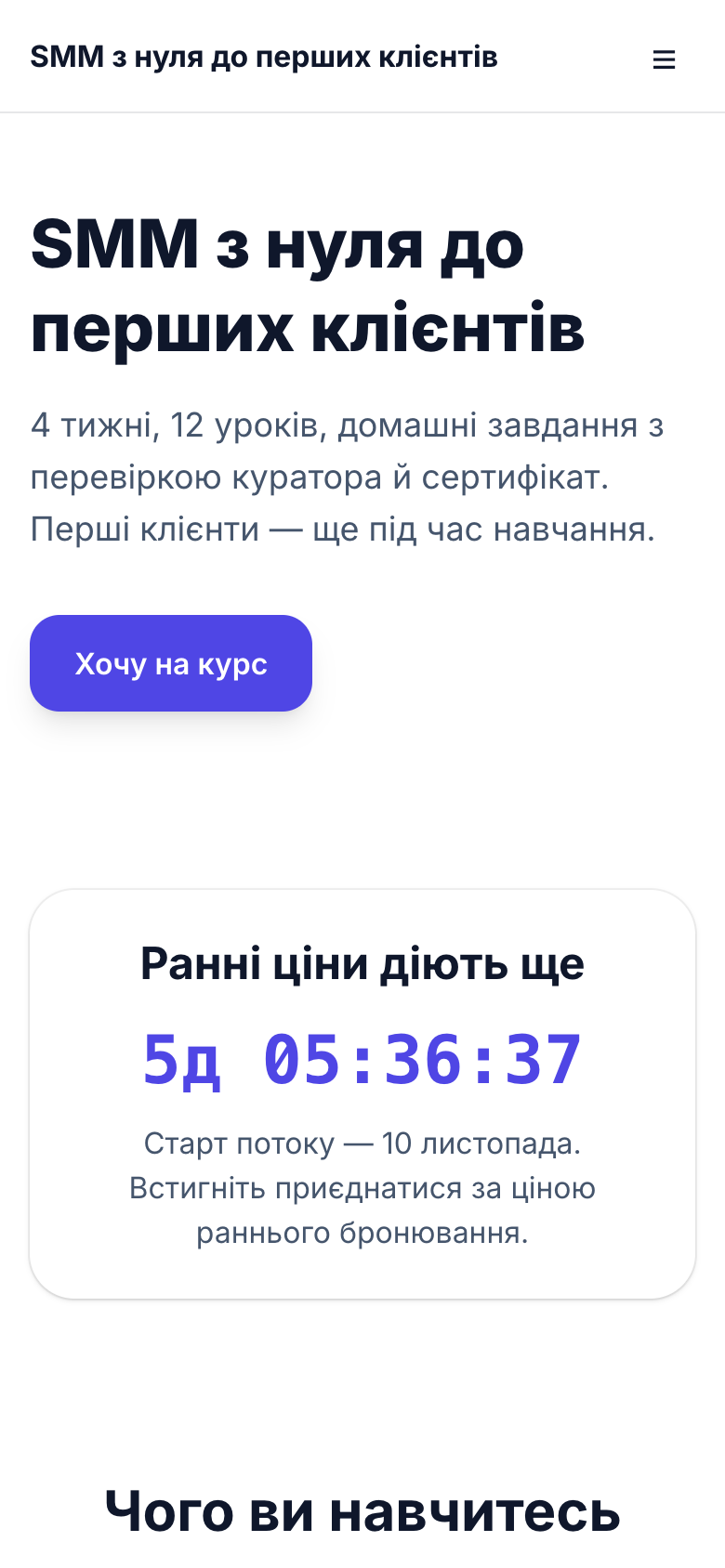
A published PulseMarko site on a phone screen: the first screen and a product block with a button
A published site on a phone. PulseMarko screenshot.
Who it is for

Who a PulseMarko site suits

A craftsperson's business card site, a site for selling products, a cafe menu: for these tasks the builder has five templates with Ukrainian sample texts ("Shop", "Services", "Course", "Cafe" and "Empty").

An Instagram shop that sells through Direct

For every buyer you have to type the price and payment details separately and ask for the address. Some buyers say "I'll think about it" at that point and disappear.

What the site will have

The "Products and prices" block: photo, description, sizes (up to 10 options), quantity from 1 to 99. For delivery you tick "Nova Poshta delivery", and the buyer enters the city and branch.

A nail technician or a barber

Bookings come through private messages, and new clients keep asking the same things: prices, address, hours.

What the site will have

The "Services" template: price list, reviews, a "Questions" block, an address with a Google map and a booking form. You can add up to 6 fields of your own to the form, for example a date or a list of services.

A coffee shop or a cafe around the corner

The menu lives in photos in Stories, and people look for opening hours in Google Maps.

What the site will have

The "Cafe" template with a menu, hours in the "Contacts and map" block and messenger buttons. The site can have several pages: "Menu", "About us", "Contacts" in one menu.

An expert selling a consultation or a course

The bank gives you a payment link, but there is nowhere on it to explain what exactly the person is buying.

What the site will have

A landing page with a program description, a video from YouTube, Vimeo or TikTok, a countdown to the start and a payment button. For lessons with student access there is a separate module, the online course platform.

3 steps

How to build a landing page for free

Most of your time goes into texts and photos. The builder itself has three tabs: "Blocks", "Preview" and "Settings".

Pick a template

In the "Sites" section click "New site", enter a name and pick a template. You can choose "Describe your business, we will build the site": from a few sentences of description, AI assembles a draft from blocks in about 20 seconds.

Replace texts and photos

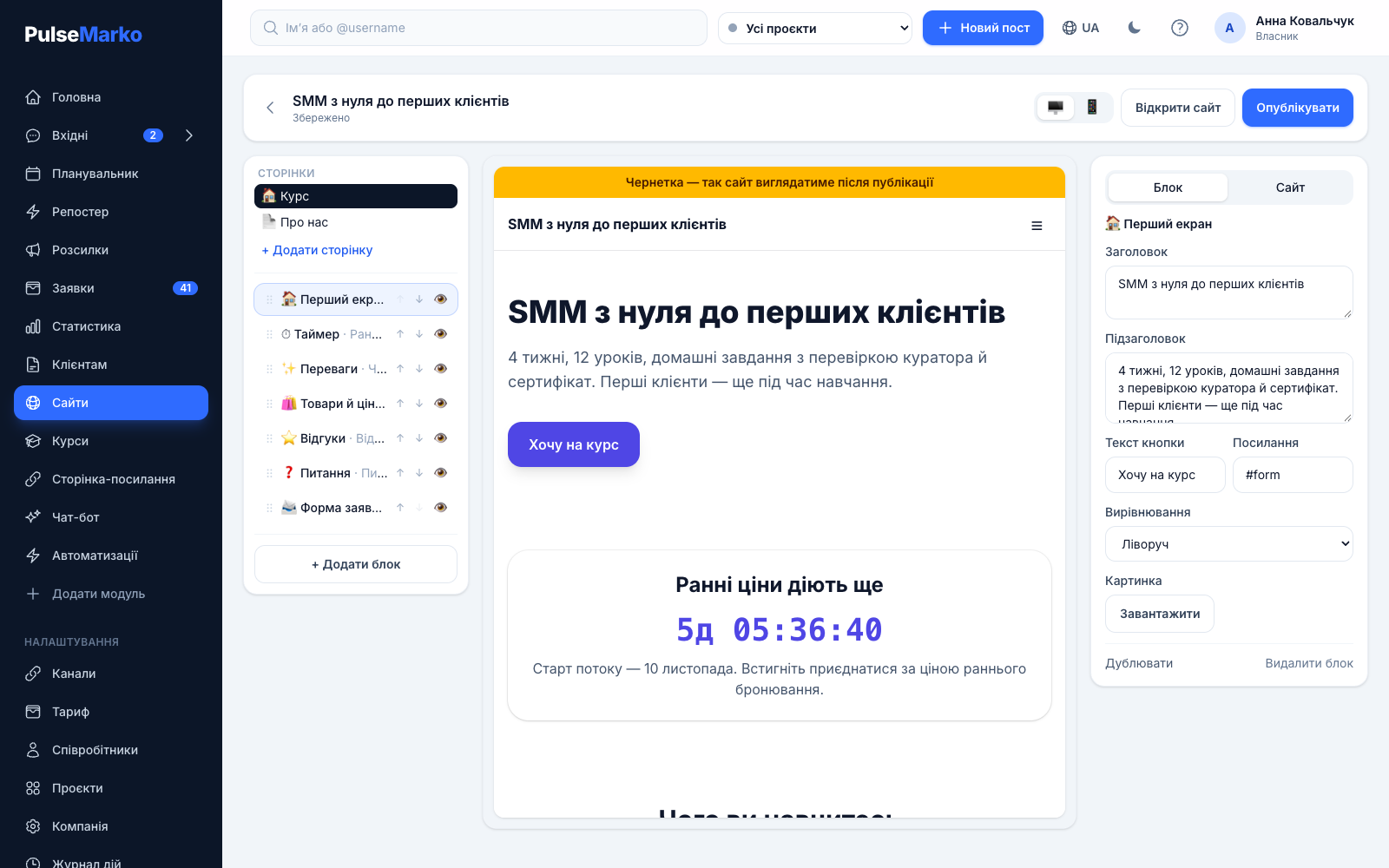
The "Blocks" tab: a click on a block opens its fields. "Add block", "Duplicate" and "Hide" change the page. Changes save themselves, and the "Preview" tab shows how the site will look on a phone.

Publish

The "Publish" button makes the site available at /web/name or on your domain. Later edits go to a draft: until you publish again, visitors see the previous version, and the editor shows "there are unpublished changes".

Features

What the website builder can do

Up to 40 blocks per page and up to 20 pages per site. The look is set for the whole site: an accent color, a light, warm or dark background, one of three fonts.

  • First screen
  • Text
  • Image
  • Gallery
  • Video
  • Products and prices
  • Benefits
  • Reviews
  • Questions
  • Request form
  • Messengers
  • Timer
  • Contacts and map
  • Button

Card payments to your account

You connect the merchant account once on the "Link in bio" page: monobank, WayForPay, LiqPay, NovaPay or Heleket for cryptocurrency. Without a merchant account the button is called "Order", and the order arrives as a request without payment.

Promo codes

The buyer enters a promo code in the product form, and the percentage discount is calculated from the order total. Codes and the usage counter are shared with the Link in bio page. You can create promo codes with the "Link in bio: Basic" plan ($3.29 per month).

Requests straight to Telegram

Name, phone, comment and your own fields arrive in "Leads" with a source label: a UTM tag, ?src= or the site the person came from. Employees who turned on notifications get a Telegram message from the bot about a request, an order and a payment.

Your own domain

The "Custom domain" field, a CNAME record at your registrar and the "Check" button. The status shows whether DNS was found and whether HTTPS works. The HTTPS certificate is issued automatically once the domain already points to PulseMarko.

SEO without plugins

A search title and description for every page, an image for social networks, the site language (Ukrainian, Russian or English). Sitemap.xml, robots.txt and markup for products, contacts and questions are created automatically.

Pixels and statistics

In the "Analytics and pixels" block you paste the ID for GA4, Google Tag Manager, Meta Pixel or TikTok Pixel. The "Lead" and "Purchase" events, with the amount, are sent automatically. The "Last 14 days" block shows views, requests, payments and conversion.

In the site settings you can choose a website live chat widget, and it appears on all pages without pasting any code. The buttons of the "Messengers" block are taken from channels you already connected, for example from your chatbot for Telegram and Viber.

Screenshots

This is what the editor and a finished site look like

The PulseMarko site editor: the list of page blocks on the left and the fields of the selected block on the right
The block editor: the order of page blocks on the left, the fields of the selected block on the right. Above them are the tabs "Blocks", "Preview", "Settings".
The same site after publishing, open on a phone
The site after publishing, on a phone. You do not need to build a separate mobile version: the blocks rearrange themselves.
Prices

How much the website builder costs

PulseMarko modules are bought separately, so with sites you do not pay extra for broadcasts or bots. The limit counts sites, not views.

Free

$0 / mo
no time limit
  • 1 site, up to 20 pages
  • Card payments, your own domain
  • 1 GB for company files
  • The line "Made with PulseMarko"
Start for free
For several brands

Basic

$3.99 / mo
≈ 180 ₴
  • 5 sites
  • No "Made with PulseMarko" line
  • 5 GB for files
  • Yearly payment: $39.90
Start for free

Pro

$8.99 / mo
≈ 405 ₴
  • 20 sites
  • No "Made with PulseMarko" line
  • 20 GB for files
  • Yearly payment: $89.90
Start for free
14 days with everything openAfter sign-up all modules work without payment, then the free tier remains.
Bundle discountTwo paid modules give −15%, three or more give −25% of the total.
How hryvnia amounts are calculatedPrices are in dollars, and the hryvnia amount uses the National Bank of Ukraine rate on the payment day. A year costs the same as 10 months.
Limits

What to know before you start

  • There is no shopping cart. Each product is ordered separately: option, quantity, promo code and payment. For a catalog of hundreds of items, a full online store is a better fit.
  • Nova Poshta delivery means "City" and "Branch" fields in the form. There is no integration with the Nova Poshta API, and you create the waybill yourself.
  • To take payments you need your own agreement with monobank, WayForPay, LiqPay or NovaPay. There is one merchant account per company, and its keys are entered on the "Link in bio" page.
  • Your own domain opens for visitors after the status "Connected, HTTPS works". Until then the site works at /web/name.
  • The design is built from ready-made blocks. There is no free placement of elements like Zero Block on Tilda.
  • Images are accepted as JPG, PNG or WebP up to 10 MB. On the site they are stored as WebP, up to 1600 px on the longer side.
  • You cannot connect Instagram, Facebook, WhatsApp and TikTok as PulseMarko channels yet: we are waiting for Meta and TikTok to approve our app. The buttons of these messengers on the site work as ordinary links to your profile or number.
Questions

Frequently asked questions about the website builder

How do I build a website for free?

Sign up for PulseMarko, open the "Sites" section and click "New site". Pick a template, replace the texts and photos and click "Publish". One site of up to 20 pages is free with no time limit. Such a site shows the line "Made with PulseMarko" at the bottom. You cannot build a site without signing up: it is tied to your account, and requests arrive there too.

What is the difference between a business card site and a landing page?

A landing page is a one-page site built for a single action: buy a product, book an appointment, leave a phone number. A business card site tells about the business as a whole and often has several pages: services, prices, contacts. The builder can do both: one page with blocks, or up to 20 pages with a menu.

How do I accept payments on the site through monobank or WayForPay?

First sign an acquiring agreement with monobank, WayForPay, LiqPay or NovaPay. Then on the "Link in bio" page paste the token or keys and choose the merchant account in the "How to accept payment" field. After that, products with a price get a "Buy" button, and after the form the buyer goes to the payment page of your merchant account. The money goes to your account, and the bank or payment service takes its fee at its own rate. The bank may ask for contacts, prices and a returns policy on the site; the "Contacts and map" and "Text" blocks cover that.

How do I connect my own domain to the site?

Enter the domain in the "Settings" tab, in the "Custom domain" field. At your registrar add a CNAME record pointing to the PulseMarko address, or an A record for a domain without www; there are hints for imena.ua, ukraine.com.ua and nic.ua. After 5 to 60 minutes click "Check". When the status becomes "Connected, HTTPS works", the old address /web/name starts redirecting visitors to your domain.

Will my site show up in Google?

The sitemap.xml, robots.txt, canonical addresses and Google markup (contacts, products, questions) are added automatically. For each page you can enter a search title and description. Your place in search results depends on your texts, your competitors and time, so we do not promise positions. If the site is not ready yet, tick "Hide from search engines".

How much does it cost to build a landing page?

One site is free with no time limit. The Basic plan is $3.99 per month (≈ 180 ₴) for 5 sites. Pro is $8.99 per month (≈ 405 ₴) for 20 sites. For a year you pay the price of 10 months. For the first 14 days after sign-up all modules are open without payment.

Can I build a site with AI?

Yes, as a draft. When creating a site choose "Describe your business, we will build the site" and write a few sentences about yourself. In about 20 seconds blocks with texts appear. Phone numbers, addresses and prices come only from your description, and you add the photos yourself. You can make up to 5 such drafts a day; read the texts before publishing.

What happens to the site if I stop paying?

For 30 more days everything works as before. After that, sites above the free limit are unpublished but not deleted: blocks, images and requests stay. When you subscribe again or free up a slot, the sites come back by themselves, starting with the oldest.
Build your first site and send yourself a test request

Pick a template, enter your phone in "Contacts and map", publish and fill in the form from your phone. The request should appear in the "Leads" section.

Start for free

1 site of up to 20 pages free, no card.