Website live chat with a bot, AI and replies from Telegram
The PulseMarko website chat goes in with one line of code or a plugin and appears as a button in the corner of the page. The visitor writes without leaving your site. You see the message in Inbox or get it in Telegram and reply from there. While the manager is busy, a bot or AI answers simple questions, and at night the chat asks for a name and phone number and saves the request.
The free tier has no end date: 1 site and 100 conversations a month. No card is needed to sign up. For the first 14 days all modules are open at the highest tier.
- Replies from Telegram
- Bot and AI
- Requests at night
- Photos and PDFs from the client
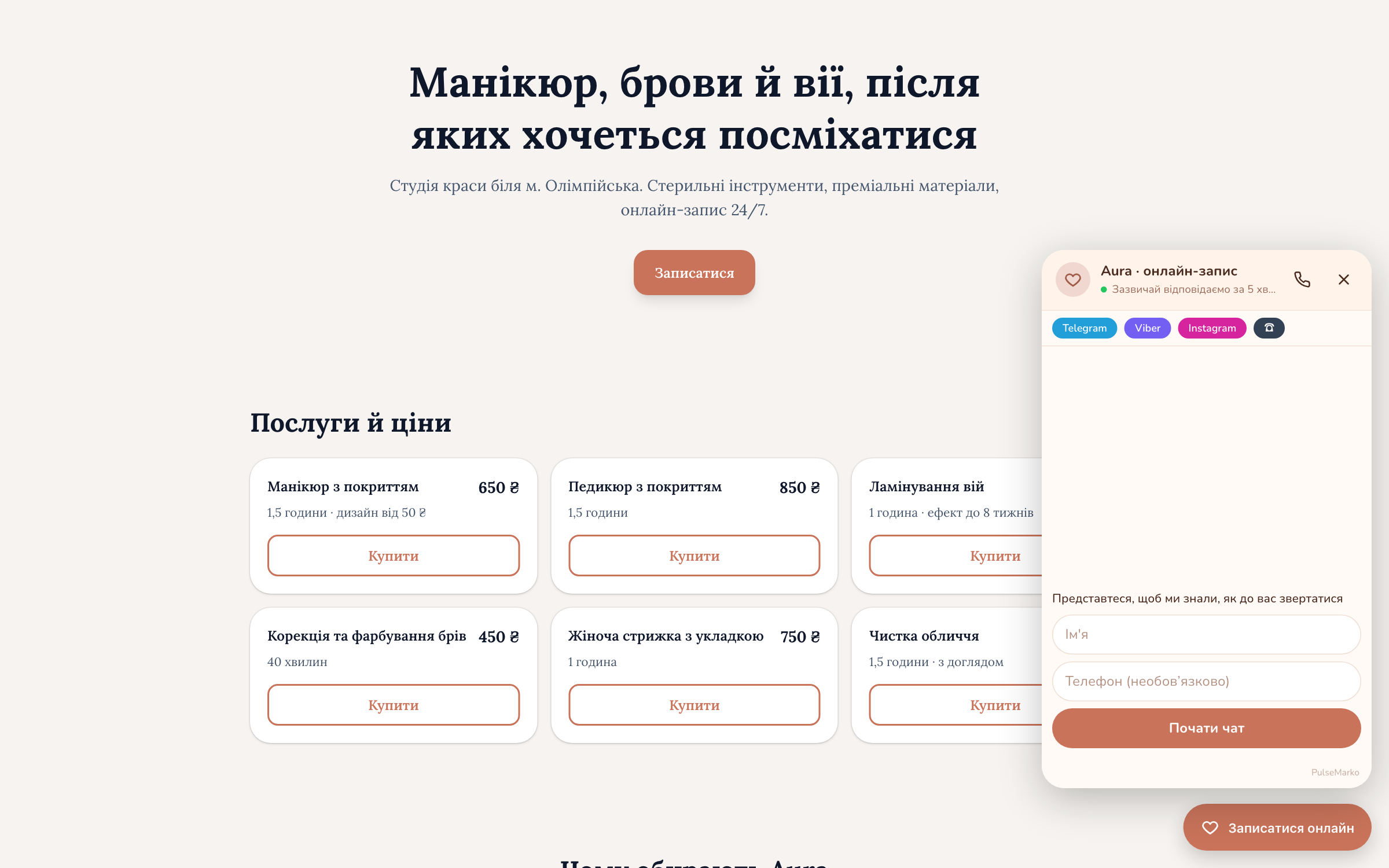
When a visitor needs an answer before buying
The person is already on a product or service page, but one question is left. If the answer means searching in another messenger or waiting for a call, some of these visitors just close the tab. A live chat on the site lets them write at once, on the same page.
The information is somewhere on the site, but the visitor didn't find it and went to compare prices in other stores.
In PulseMarkoOn the cart page you can show your own quick buttons: "Delivery", "Payment", "Returns". A tap becomes a message, and a scripted bot or a manager answers it.
The working day is over, the message will be read in the morning, and by then the client has bought elsewhere.
In PulseMarkoSet working hours by day. Outside them the chat shows your text and asks for a name and phone number, and the request goes to "Leads" with a notification to you.
The admin panel is open on a work laptop, and the person is at the warehouse or on a site visit.
In PulseMarkoThe first message from the site arrives in Telegram from your company's bot. The visitor sees your reply (Reply) in the chat window on the site.
Without a picture it's hard to tell which part or size is meant, and the person doesn't want to switch to Viber.
In PulseMarkoThe visitor attaches a photo (JPG, PNG, WebP) or a PDF up to 10 MB right in the chat window. The manager sees a thumbnail in Inbox.
How to add the chat to your site in 3 steps
You don't need a programmer. If you have ever pasted a Google Analytics or pixel code, this is the same thing.
Create a web chat
After sign-up open "Channels", choose "Web chat", enter a name and press "Create web chat".
Add the code or a plugin
In the "Code for your site" block press "Copy" and paste the line before </body>. Popular CMSs have ready-made plugins with your chat's address already filled in.
Check it
The "Open chat to check" button opens the window the way a visitor will see it. Write yourself a test message and see how it arrives in Inbox.
CMS plugins
- WordPress 5.8+ and WooCommerce
- Joomla 4 and 5
- OpenCart 3.x
- PrestaShop 1.7 and 8
- Drupal 10 and 11
For WordPress: Plugins → Add New → Upload Plugin → pulsemarko-chat.zip → Activate.
Instructions for site builders
- Tilda
- Wix
- Shopify
- Horoshop
- Prom.ua
- Google Tag Manager
Step-by-step hints are right on the settings page. If your site was made in the PulseMarko website builder, you don't need any code: you pick the chat from a list in the site settings.
A chat widget that matches your site's style
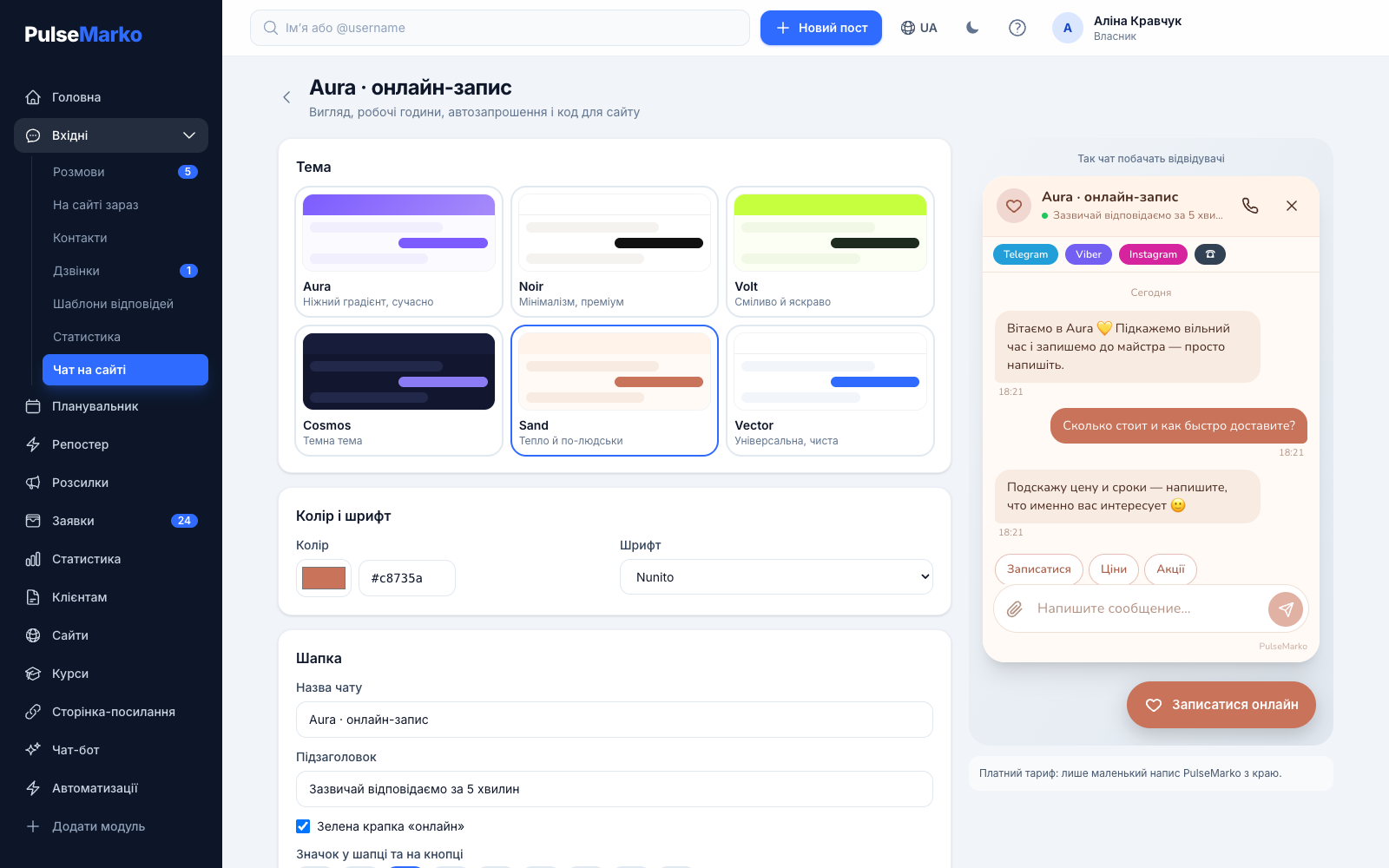
Everything is set on the "Chat appearance" screen, and the result is shown on the right in the "How visitors will see the chat" block.
- 6 themes: Aura, Noir, Volt, Cosmos (dark), Sand, Vector. On top of a theme you can set your own color and font (Inter, Nunito or Lora).
- In the header there is an icon, the first letter of the name, or your photo or logo (JPG, PNG, WebP up to 2 MB).
- The button on the site: a circle, rounded, a square, or with text such as "Write to us". Bottom right or bottom left.
- "Bottom offset" raises the button so it doesn't cover the cart, the "Back to top" button or a cookie banner.
- The window can offer other ways to reach you: links to Telegram, Viber, WhatsApp, Instagram, Facebook and a phone number.
What the chat does while you are busy
The bot answers common questions
If the channel has a "Start" flow, it runs in the chat instead of the greeting. Flows are built in the Bots module, with details on the page chatbot without a programmer.
Website chat with AI
AI answers questions from your business description and hands the conversation to a person when it doesn't know the answer. 50 answers a month are free. How it works is described on the page AI answers to customer questions.
Auto-invitations
Up to 5 rules. The chat writes to the visitor by itself after a set number of seconds on the right page. Conditions: part of the address, visit number, phone or computer, Ukraine or another country, whether an operator is online now. It fires once per visit.
"On the site now"
You see which page the person is on, where they came from (utm or source site), from which device and which visit it is. The manager can write first.
"Call me back"
The visitor leaves a number and picks a time: now, within an hour, this evening or tomorrow. The request goes to the "Calls" section and you get a notification. The button is turned on in the chat settings.
Alert if nobody replied
After 2, 5 or 10 minutes without a reply during working hours, PulseMarko sends a reminder in Telegram. Meanwhile the visitor sees "The manager is busy right now" and a "Leave a phone number" button.
Window language
Ukrainian, Russian or English. In "Automatic" mode the window takes the language of the site or of the visitor's browser.
Analytics events
If the site has GA4, Google Tag Manager or Meta Pixel, the events pulsemarko_chat_started, pulsemarko_contact_left, pulsemarko_callback_requested and others are sent there. You don't need to set anything up separately.
Conversation rating
After a conversation the manager can ask for a rating, and the visitor presses "Good" or "Bad". The ratings appear in the operator performance report.
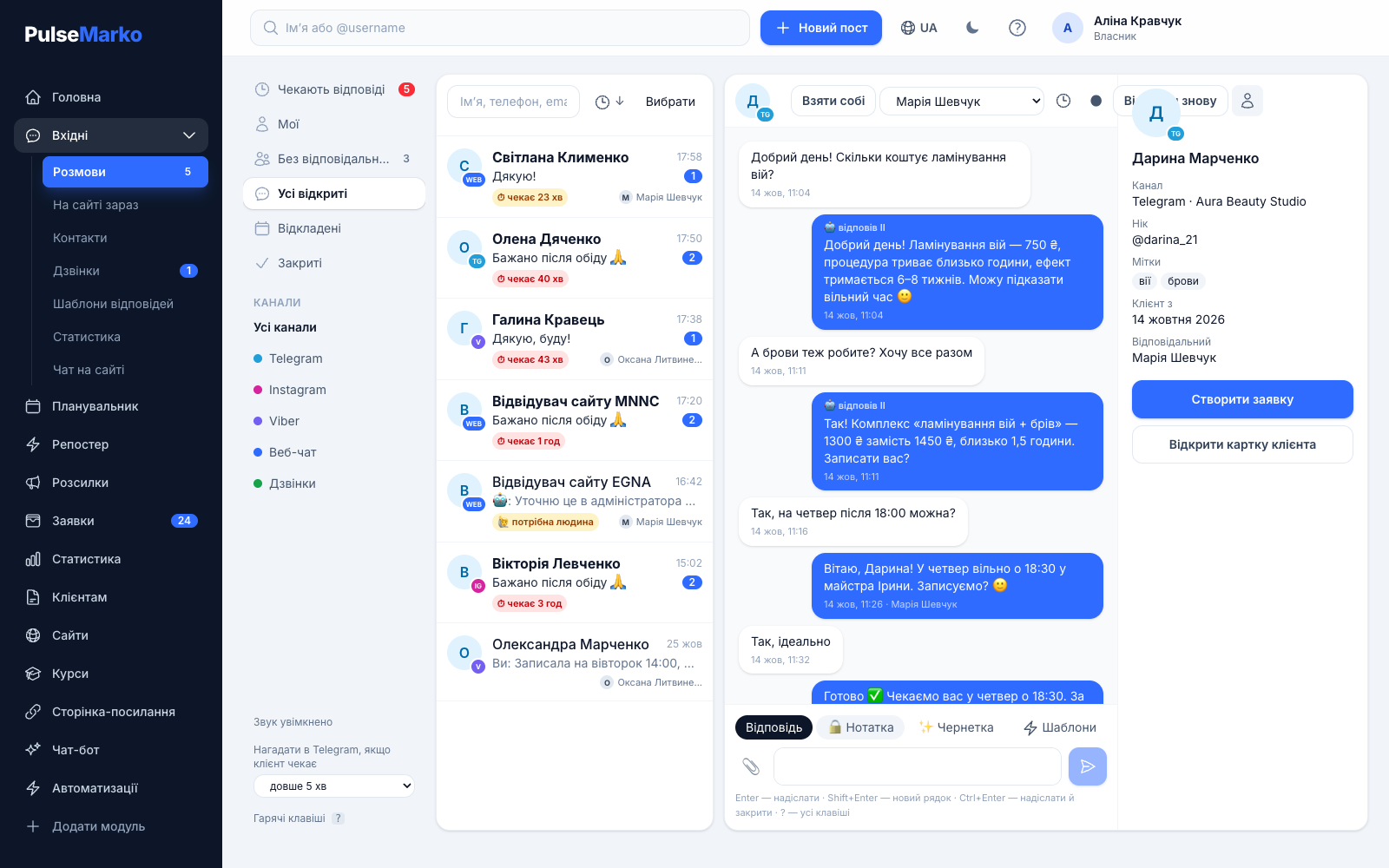
Website chat with Telegram: the manager replies from wherever is convenient
The visitor doesn't need a Telegram account, they write in a regular window on the site. Telegram is needed by you: you connect your company's bot and turn on notifications, and then new messages from the site arrive in Telegram with a link to the conversation.
- The visitor receives your Reply to a notification in the chat window.
- If a conversation is assigned to a manager, notifications go only to them.
- Inbox has ready-made replies (up to 200), sound and browser notifications.
- The site, Telegram and Viber are collected in one list. More on the page all messengers in one Inbox.
How much a website live chat costs
PulseMarko modules are bought separately, so you pay only for the chat. The free tier has no end date. A conversation means a visitor who wrote at least one message this month. If a person opened the window and wrote nothing, the limit is not used.
Free
- 1 site
- 100 conversations a month
- All appearance settings, auto-invitations, working hours
- "Made on PulseMarko" credit at the bottom of the window
Basic
- Up to 3 sites
- 1,000 conversations a month
- A small PulseMarko label on the side instead of the large credit
Pro
- Up to 10 sites
- 5,000 conversations a month
- For agencies and store chains
What to know before connecting
- There is no mobile app for operators. They work in the browser (on a phone too) or reply in Telegram.
- Automatic call-back, where the phone system connects the manager to the client itself, works only with Zadarma and Binotel, during working hours and for the "Now" option. With Ringostat, Unitalk and CallsApp the call request goes to the manager, who calls back on their own.
- The greeting and the out-of-hours text are written in one language for now, even if the window's buttons switch automatically.
- The bot and AI don't read photos and PDFs that visitors send. A person answers those. Files take up company storage: on the free tier that is 1 GB.
- Instagram, Facebook and WhatsApp as channels in Inbox are in development until Meta finishes its review. In the chat window you can add regular links to them.
- Wix allows custom code only on a premium plan with a connected domain. On Prom.ua third-party scripts are not available on all plans.
- Anonymous visitors (with no name, phone, email or requests) are deleted after 90 days. Conversation history is kept for 90 days on the free tier and for 730 days with any paid module.
Frequently asked questions about the website chat
What is a live chat for a website?
It is a button in the corner of the page that opens a chat window. The visitor types a question without leaving the site, and a manager, a scripted bot or AI answers. In PulseMarko all such conversations are collected in Inbox.
How do I add a live chat to my website without a programmer?
Create a web chat in "Channels", copy the line from the "Code for your site" block and paste it before </body>. There are ready-made plugins for WordPress, Joomla, OpenCart, PrestaShop and Drupal, and step-by-step instructions on the settings page for Tilda, Wix, Shopify, Horoshop, Prom.ua and Google Tag Manager.
How much does a website live chat cost?
1 site and 100 conversations a month are free, with no end date. The Basic tier costs $4.99 a month (≈ ₴225): 3 sites and 1,000 conversations. Pro costs $11.99 (≈ ₴540): 10 sites and 5,000 conversations. A year is paid as 10 months.
Does the visitor need a Telegram account to write?
No. The visitor writes in the window on the site. Telegram is only needed by the manager, if they want to get notifications and reply from there with Reply.
How is a live chat different from a chatbot?
In a live chat a person answers, while a chatbot works by a script written in advance. In PulseMarko they work together: the bot handles typical questions, and when needed a manager takes over the conversation.
Is the chat suitable for an online store?
Yes. You can set separate quick buttons for the cart and catalog pages, for example "Delivery" and "Find my size", and show the auto-invitation only to people who opened the cart. The WordPress plugin works with WooCommerce, and there are plugins for OpenCart and PrestaShop.
What happens when someone writes at night?
Outside working hours the chat shows your text and asks for a name and phone number. The request goes to "Leads" and you get a notification. The auto-reply is sent to a visitor no more than once a day.
Will the chat slow down my website?
Only a small script with the button loads on the page right away. The chat window itself opens in a separate frame only after the button is pressed. We don't publish separate speed measurements yet.
What happens when the conversation limit runs out?
Messages keep arriving in Inbox, and a manager can reply. The bot and AI no longer answer new conversations until the start of next month or until you move to a higher tier.
What people connect together with the chat
Put the chat on your site and see who writes in the first week
Sign-up takes a minute, and pasting the code takes a few more. 100 conversations a month are free for one site.
Start for freeNo card. You can move to a paid tier at any time in the "Plan" section.